Sunday, June 26, 2011

Find IP Address of a machine using Java (java.net)

Code to Find the IP Address of a local machine or any website on the network

import java.io.IOException;

import java.net.*;
public class Network {

    /**
     * @param args
     * @throws IOException
     */
    public static void main(String[] args) throws IOException {
        // TODO Auto-generated method stub
        // Get Hostname of the local machine
        sop("Local Host Name"+InetAddress.getLocalHost());
        //Get IP of google.co.in
        //Get IP of google.com
        sop("IP of website google.co.in : "+InetAddress.getByName("google.co.in"));
        sop("IP of website google.com  : "+InetAddress.getByName("google.com"));
        sop("IP address of my website "+InetAddress.getByName("javaapionline.com"));
       
   
       // Google has multiple IPs. To List all the IP's use getAllByName
        InetAddress SW[] = InetAddress.getAllByName("www.google.com");
        for (int i=0; i
        System.out.println(SW[i]);
       
       
        // Google - Sites - Using Instance of Address
        // Access hostname or host address
        InetAddress Address = InetAddress.getByName("google.com");
        sop("Google Host Name : "+Address.getHostName());
        sop("Google Host Address : "+Address.getHostAddress());
             
    }

    public static void sop(String b)
    {
        System.out.println(b);
       
    }
    public static void sop(boolean b)
    {
        System.out.println(b);
    }
}


--------------------------------------------------------------------------------

Sample Output ( Could Vary on your machine )
Local Host Name : xxx-xxx/124.123.161.188
IP of website google.co.in : google.co.in/74.125.236.49
IP of website google.com  : google.com/74.125.236.51
IP address of my website javaapionline.com/38.101.213.236
www.google.com/74.125.236.48
www.google.com/74.125.236.49
www.google.com/74.125.236.50
www.google.com/74.125.236.52
www.google.com/74.125.236.51
Google Host Name : google.com
Google Host Address74.125.236.51

Monday, June 6, 2011

Create 5 Table Cell Data in Single Column in a PDF File

Jar : PDFBox from Apache

http://www.javaapionline.com/2011/06/create-pdf-document-using-java-pdfbox.html


An Extension to the earlier program.
Create 5 Rows of Data Cells

I decided to add in 5 Cells in a Single Column

Here's how the code will look.

/*
 * Author : Ajith Moni
 * Date : June 6th 2011
 */
import java.io.IOException;

import org.apache.pdfbox.exceptions.COSVisitorException;
import org.apache.pdfbox.pdmodel.PDDocument;
import org.apache.pdfbox.pdmodel.PDPage;
import org.apache.pdfbox.pdmodel.edit.PDPageContentStream;
import org.apache.pdfbox.pdmodel.font.PDFont;
import org.apache.pdfbox.pdmodel.font.PDType1Font;


public class PDFTableSingleColumn {

    public static void main(String[] args)
            throws IOException, COSVisitorException {
       
        // Create the PDF Document
        PDDocument document =new PDDocument();
        // Create a Page of the PDF Document
        PDPage page1=new PDPage();
        // Add the created page to the PDF Document
        document.addPage( page1 );
       
        // Set Font Type
        PDFont font = PDType1Font.HELVETICA_BOLD;
       
        // Create a Stream for the Document and page
        PDPageContentStream contentStream = new PDPageContentStream(document, page1);
       
        // Begin Text
        contentStream.beginText();
        // The X and Y co-ordinates start from the end of the page
        // Use the following methods to get the results -
        // might vary on your machine.
        // 612.0
        // 792.0
        System.out.println(page1.getArtBox().getUpperRightX());
        System.out.println(page1.getArtBox().getUpperRightY());
       
        // Margin of the Document - X Value
        int margin=50;
       
        // Max val - 792 - Set Margin from top - Y Value
        int y1=750;
        int y2=750;
       
        // Dimensions of the cell to draw
        // length  - length of the line
        // breadth - height of the cell
        int length=100; 
        int breadth=30;
       
       
        // draw 5 cells having single column
            for(int rows=0;rows<5;rows++)
            {
                // draw the horizontal lines
                contentStream.drawLine(margin, y1, margin+length, y2);
                // breadth
                contentStream.drawLine(margin, y1, margin, y1-breadth);
                contentStream.drawLine(margin+length, y1, margin+length, y2-breadth);
                y2-=breadth;
                y1=y2;
            }
            // Draw the closing of the Cell
            contentStream.drawLine(margin, y1, margin+length, y2);
           
       
                // Close the Text
                contentStream.endText();

                // Closing the Connection is Important
                // especially when using multiple pages
                contentStream.close();
       
        document.save("D:\\Trash\\PDFTableSingleColumn.pdf");
       
        document.close();   


    }
   
}
For Creating a Compelete Table with N Rows and N columns, See the Article  :
http://www.javaapionline.com/2011/06/create-table-with-rows-and-columns-in.html
Also Read :

Create Table with Rows and Columns in a PDF File

Jar Used : PDFBox from Apache

http://www.javaapionline.com/2011/06/create-pdf-document-using-java-pdfbox.html

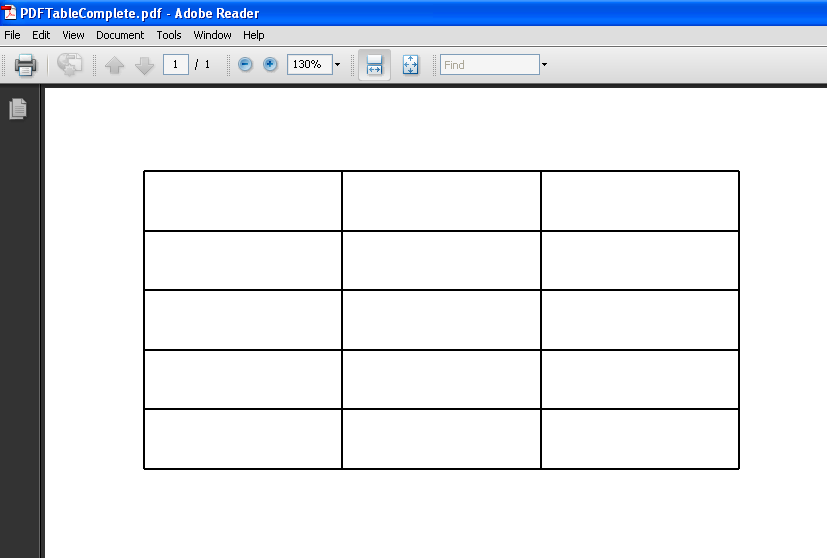
The following code is used to Create a Table in PDF with 5 Rows and 3 Columns.


/*
 * Author : Ajith Moni
 * Date : June 6th 2011
 */
import java.io.IOException;

import org.apache.pdfbox.exceptions.COSVisitorException;
import org.apache.pdfbox.pdmodel.PDDocument;
import org.apache.pdfbox.pdmodel.PDPage;
import org.apache.pdfbox.pdmodel.edit.PDPageContentStream;
import org.apache.pdfbox.pdmodel.font.PDFont;
import org.apache.pdfbox.pdmodel.font.PDType1Font;


public class PDFTableComplete {

    public static void main(String[] args)
            throws IOException, COSVisitorException {
       
        // Create the PDF Document
        PDDocument document =new PDDocument();
        // Create a Page of the PDF Document
        PDPage page1=new PDPage();
        // Add the created page to the PDF Document
        document.addPage( page1 );
       
        // Set Font Type
        PDFont font = PDType1Font.HELVETICA_BOLD;
       
        // Create a Stream for the Document and page
        PDPageContentStream contentStream = new PDPageContentStream(document, page1);
       
        // Begin Text
        contentStream.beginText();
        // The X and Y co-ordinates start from the end of the page
        // Use the following methods to get the results -
        // might vary on your machine.
        // 612.0
        // 792.0
        System.out.println(page1.getArtBox().getUpperRightX());
        System.out.println(page1.getArtBox().getUpperRightY());
       
        // Margin of the Document - X Value
        int margin=50;
       
        // Max val - 792 - Set Margin from top - Y Value
        int y1=750;
        int y2=750;
       
        // Dimensions of the cell to draw
        // length  - length of the line
        // breadth - height of the cell
        int length=100; 
        int breadth=30;


            // For Each Column Draw the length and Width
            for(int cols=0;cols<3;cols++)
            {
                // draw length line
                // draw breadth
               
                // draw rows
                for(int rows=0;rows<5;rows++)
                {
                    // draw the horizontal lines
                    contentStream.drawLine(margin, y1, margin+length, y2);
                    // breadth
                    contentStream.drawLine(margin, y1, margin, y1-breadth);
                    contentStream.drawLine(margin+length, y1, margin+length, y2-breadth);
                    y2-=breadth;
                    y1=y2;
                }
                contentStream.drawLine(margin, y1, margin+length, y2);
                margin=margin+length;
                y1=y2=750;
            }
       

                // Close the Text
                contentStream.endText();

                // Closing the Connection is Important
                // especially when using multiple pages
                contentStream.close();
       
        document.save("D:\\Trash\\PDFTableComplete.pdf");
       
        document.close();   


    }
   
}

Sunday, June 5, 2011

Create a Table Data into Cell in PDF

Now that i have been able to create text into the document. I thought entering Table Data into PDF could be of more help.

Just in Case You missed out the related article, you can check it out here
http://www.javaapionline.com/2011/06/create-pdf-document-using-java-pdfbox.html

Writing the entire code for creating Table like data Could be too complex to understand, so I have narrowed down the problem such that
  • I create a single cell in a PDF document and display text within the cell. You could extend and advance the logic to fit it to your needs.

/*
 * Author : Ajith Moni
 * Date : June 5th 2011
 */
import java.io.IOException;

import org.apache.pdfbox.exceptions.COSVisitorException;
import org.apache.pdfbox.pdmodel.PDDocument;
import org.apache.pdfbox.pdmodel.PDPage;
import org.apache.pdfbox.pdmodel.edit.PDPageContentStream;
import org.apache.pdfbox.pdmodel.font.PDFont;
import org.apache.pdfbox.pdmodel.font.PDType1Font;


public class PDFTest1 {

    public static void main(String[] args)
            throws IOException, COSVisitorException {
       
        // Create the PDF Document
        PDDocument document =new PDDocument();
        // Create a Page of the PDF Document
        PDPage page1=new PDPage();
        // Add the created page to the PDF Document
        document.addPage( page1 );
       
        // Set Font Type
        PDFont font = PDType1Font.HELVETICA_BOLD;
       
        // Create a Stream for the Document and page
        PDPageContentStream contentStream = new PDPageContentStream(document, page1);
       
        // Begin Text
        contentStream.beginText();
        // The X and Y co-ordinates start from the end of the page
        // Use the following methods to get the results -
        // might vary on your machine.
        // 612.0
        // 792.0
        System.out.println(page1.getArtBox().getUpperRightX());
        System.out.println(page1.getArtBox().getUpperRightY());
       
        // Margin of the Document - X Value
        int margin=50;
       
        // Max val - 792 - Set Margin from top - Y Value
        int y1=750;
        int y2=750;
       
        // Dimensions of the cell to draw
        // length  - length of the line
        // breadth - height of the cell
        int length=100; 
        int breadth=50;
       
           
        // draw from left to right
        // ______________
       
        contentStream.drawLine(margin, y1, margin+length, y2);
       
        //draw from right to down - using breadth of rectangle
        //    ______________
        //                                |
       
        contentStream.drawLine(margin+length, y2, margin+length, y2-breadth);
        //draw line from left to right
        //    ______________
        //    ______________|
       
        contentStream.drawLine(margin,y1-breadth,margin+length,y2-breadth);
        // draw line from the remaining line
        //     ______________
        //    |______________|
        contentStream.drawLine(margin, y1, margin, y2-breadth);
   
       
        /*
         *  Draw text within the cell
         *  int length=100;
         *  int breadth=50;
         */
        // Setting Font is very important, else the text will not be displayed.
        contentStream.setFont(PDType1Font.HELVETICA_BOLD,12);
        contentStream.moveTextPositionByAmount(margin+30, y1-30);
        contentStream.drawString("Text");
        // Close the Text
        contentStream.endText();

        // Closing the Connection is Important
        // especially when using multiple pages
        contentStream.close();

        document.save("D:\\Trash\\PDFTableCell.pdf");
       
        document.close();   


    }
   
}

Create a PDF Document using Java PDFbox

Weekend Time,  Scratching my head to learn something new.
I'm glad I did something at least i feel i have. :-)

Something was in my head, what if i need to code to create a PDF document at some point in my life ???

I was aware of Apache's POI being used to handle Excel Sheets, tried a sample script then thought what if i need to create a pdf file.

I am glad i tried it. Okay, lets get on with why we are or rather why you are here.
Check Out :   Apache PDFBox

Download link for the jar file :  http://pdfbox.apache.org/download.html

I downloaded the version pdfbox-app-1.5.0.jar. Please always download a stable download, avoids we being testers where you expecting things to work for first time. You would not be wanting to do a QA job right ;-) especially when it's someone else's product.

Java Development Environment :

I Choose Eclipse, it makes my work simple. I strongly suggest readers to use the same, saves a lot of time researching how stuff works ( avoids the ant and stuff that scare you over the net).


  • Create a New Project named "PDF Test"
  • In the Package Explorer, Right Click > Properties
  • Go to Java Build Path
  • Select Libraries Tab
  • Click on "Add External Jars"

Lets say you have saved your jar  pdfbox-app-1.5.0.jar at location D:\Jars\pdfbox-app-1.5.0.jar
Browse and select the jar.

Click Okay.
You are good to go.

Now Create a Sample Java file as follows. I've named it PDFTest


import java.io.IOException;

import org.apache.pdfbox.exceptions.COSVisitorException;
import org.apache.pdfbox.pdmodel.PDDocument;
import org.apache.pdfbox.pdmodel.PDPage;
import org.apache.pdfbox.pdmodel.edit.PDPageContentStream;
import org.apache.pdfbox.pdmodel.font.PDFont;
import org.apache.pdfbox.pdmodel.font.PDType1Font;


public class PDFTest {

    public static void main(String[] args) throws IOException, COSVisitorException {
       
       
        PDDocument document =new PDDocument();
       
        PDPage page = new PDPage();
        document.addPage( page );
       
        PDFont font = PDType1Font.HELVETICA_BOLD;
        PDPageContentStream contentStream = new PDPageContentStream(document, page);
       
        contentStream.beginText();
        contentStream.setFont( font, 12 );
        //contentStream.moveTextPositionByAmount( 0, 700 );
        contentStream.moveTextPositionByAmount( 10, 700 );
        contentStream.drawString( "Hello World" );
        contentStream.endText();
        contentStream.close();

        document.save("D:\\BlankPage.pdf");
       
        document.close();
        document.close();


    }
}


You can view the file under the D drive in the above mentioned example.

I hope this gives a confidence boost that at least you can print a Hello World into a PDF file before exploring it further.

I tried extending to create table like data, so I've taken a sample version of it to create a Single Cell with Value in it.

http://www.javaapionline.com/2011/06/create-table-data-into-cell-in-pdf.html
Ciao for now
Regards,
Ajith Moni