Thursday, January 1, 2015

Layout sizes of Various Devices (Pixels and Resolution)

I found this wonderful site while reading a book.
Do take a look at the link if you want to understand what layout each mobile version support!

http://viewportsizes.com/

Saturday, November 29, 2014

Relationships:Men prefer Men as "Punch bags" - Women ponder WHY?

It came to today morning, I thought I should write this out.

Reflection:

Why is it that my friend complains of his married life and prefers to be with his friends than spend time with his wife ?


Probably this could also be a question in a lady love's i.e., a woman's mind as to "Why my husband/boy friend spends so much time with this particular friends and not me?"

Description

Men and Women life different lives before they come together as one. Each of their complains are valid, its the element of love that dies.

My perspective for this situation is that "Men need to be respected and honored before they could open up their complaint box for a solution". "Women need to find out Man's close friend who's offering the love element to understand what is missing in their relationship".

There are some factors women need to keep in their mind before they do so. First, never ever let her husband find out the inputs she received from the friend. Second, the person sharing this has to a trustworthy who will no make situations work".

Alright, enough of disclaimers, let's get going :

Woman offer solutions to men with love, men are offended as they never asked for their opinion.
Man never shared the problem because he assumed or never conveyed his feelings were to be respected and he would ask if he needed.

Why does a man rush to his close buddy?
Men understand Men in the same manner as a woman would understand a man.
Men are close because they understand when to offer advice and when to listen.
One of them is unknowingly listening and empathizing playing the role of a Woman which his wife or girl friend wouldn't do. That person playing the listener is a man when to offer an advice and when not. He knows the pulse of his mate because of the considerable time he has spent.
Men share their weaknesses with men or men realize their weakness because of the saying "Birds of the same feather flock together". They have been brought up the same way, share the similar habits, know how to socialize, understand the strengths and weakness and build a love and hate relationship despite being together".

Men love freedom, they know when to let go things, when to listen and when not to listen to let the comfort zone among them active. They may fight and reunite the next day with the blessed gift of "amnesia". They may carry forward their differences only as lessons- learnt to build a stronger bonding than ruin their relationship for a petty difference.

They would flower in compliments of success and achievement of goals to keep each others confidence levels high to keep that bond alive.

Learnings about men:

Learn to let go - Learn to not suggest
Listen like a woman, learn his pulse.

Understand a man's behavior with his friends - he will speak frequently to very few men most of the time. They are his punching bags.
Respect and honour his abilities
Do not challenge him - unless you know the coolant recipe for his ego
Give him his Space and Time - He will respect and come back to you.
Dont be surprised if he has done something unconventional - Men have mood swings too.


Cheers,
Ajith

Wednesday, September 25, 2013

Powershell - Get Process and Kill Process - Automation

As part amateur programming, we end up queing a lot of processes in the taskbast and manually deleting them.

I was using eclipse and i realised that I had a lot of processes with the name iexplore.exe and console.exe. Even if I manually try to kill each one, I have a long way to go.

Automation is the key. Powershell is the solution I found that worked for me.

Steps to kill a process
Launch three or four internet explorer windows in the application.
Launch the command shell - Windows + R, In the run window, enter command as "powershell" without quotes.

In the Powershell use the following commands

get-process iexplore
kill -Name iexplore

- Name tells the shell to kill all the process "names" that have iexplore.
You can get a complete list of arguments by using
help get-process

MSDN link : http://technet.microsoft.com/library/hh849832.aspx

Regards,
Ajith Moni


Sunday, September 8, 2013

Day Light Savings & Seasons in USA CST and CDT

It has long been long that I wanted to figure out what Day Light Savings actually means!


Daylight Savings Time is Effective from Mar to Nov and varies from year to year.

Daylight Saving Time resumes at 2 a.m. on Sunday, March 10, 2013 in the United States. It will end on Sunday, November 3, 2013 at 2 a.m.

Winter and Fall can be read as "Spring forward, Fall back"

The phrase "Spring forward, Fall back" helps people remember how Daylight Saving Time affects their clocks. At 2 a.m. on the second Sunday in March, we set our clocks forward one hour ahead of Standard Time ("Spring forward," even though Spring doesn't begin until late March, over a week after the start of Daylight Saving Time).

They "Fall back" at 2 a.m. on the first Sunday in November by setting our clock back one hour and thus returning to Standard Time.


The change to Daylight Saving Time ostensibly allows us to use less energy in lighting our homes by taking advantage of the longer and later daylight hours.

During the eight-month period of Daylight Saving Time, the names of time in each of the time zones in the U.S. (map) change as well.
  1. Eastern Standard Time (EST) becomes Eastern Daylight Time
  2. Central Standard Time (CST) becomes Central Daylight Time (CDT)
  3. Mountain Standard Time (MST) becomes Mountain Daylight Time (MDT)
  4. Pacific Standard Time becomes Pacific Daylight Time (PDT), and so forth.

The Act extended Daylight Saving Time by four weeks from the second Sunday of March to the first Sunday of November, with the hope that it would save 10,000 barrels of oil each day through reduced use of power by businesses during daylight hours.

USA Seasons
Spring = late March, April, June, July
Summer= late July, August, September
Fall = late September, October, November, early December
Winter = late December, January, February, March

Source & Coutesy : http://geography.about.com/cs/daylightsavings/a/dst.htm

Summary of Six Sigma and Green Belt


I took time to learn and share my understanding having heard the words Six Sigma and Green belt from an associate. Here's my short summary of the understanding.

What is Six Sigma?

It is associated with manufacturing.
Statistical modelling of manufacturing processes.
It is a set of tools and techniques/strategies for process improvements
orginally developed by Motorolla in 1981
Well known after its use in business strategy at General Electric in 1995
Focuses on Quality Management methods & statistical methods

Goals addressed by Sigma

Seeks to improve the quality of process outputs by identifying and removing the causes of defects(errors)
Minimizing variability in Manufacturing and Business Processes.
Quantified value targets
Example :
Process cycle time reduction,customer satisfaction,reduction in pollution,cost reduction & profit increase

Methodology

Follows two project methodologies - 5 phase approach
DMAIC - improve existing business process
Define, Measure, Analyze, Improve and Control
DMADV - creating a new product or process designs
Define, Measure, Analyze, Design, Verify

Tools & its application
    Arena
    ARIS Six Sigma
    Bonita Open Solution BPMN2 standard and KPIs for statistic monitoring
    JMP
Read more on : http://en.wikipedia.org/wiki/Six_Sigma


Maturity Rating

A Sigma rating indicates its yield or the percentage of defect free products it processes.
A six sigma process is one in which 99.99966% of the products manufactured are statistically expected to be free of defects
(3.4 defects per million)

All the belts

Champions take responsibility for Six Sigma implementation across the organization in an integrated manner. The Executive Leadership draws them from upper management. Champions also act as mentors to Black Belts.
Master Black Belts, identified by champions, act as in-house coaches on Six Sigma. They devote 100% of their time to Six Sigma. They assist champions and guide Black Belts and Green Belts. Apart from statistical tasks, they spend their time on ensuring consistent application of Six Sigma across various functions and departments.

Black Belts operate under Master Black Belts to apply Six Sigma methodology to specific projects.They primarily focus on Six Sigma project execution and special leadership with special tasks

Green Belts are the employees who take up Six Sigma implementation along with their other job responsibilities, operating under the guidance of Black Belts.
Additional ( informal )
Yellow Belts, for employees that have basic training in Six Sigma tools and generally participate in projects and
"White belts" for those locally trained in the concepts but do not participate in the project team.
"Orange belts" are also mentioned to be used for special cases.


Sources :

http://asq.org/learn-about-quality/six-sigma/overview/belts-executives-champions.html
http://prdweb.asq.org/certification/control/six-sigma-green-belt/index
http://en.wikipedia.org/wiki/Six_Sigma
http://www.isid.ac.in/~sqc/gb.html

Regards,
Ajith Moni

Tuesday, May 7, 2013

List of Technical Blogs

-->
Blog Category
Blog Name
Automation Testing & Quality Assurance
Oracle Application Testing Suite
R12 Oracle Applications ERP Applications
QTP
QTP and VB Scripting

-->
Above listed are blogs that have relevant technical content I have learnt and documented in the form of blogs.

Regards,
Ajith Moni ( Alias Ajith Charles )

Saturday, May 4, 2013

What is Sun sign, Moon Sign, Ascendant Nakshatra and Match Making in Astrology

Hi All,

Astrology and Terms such as sun sign, moon sign, ascendant are my findings that help every beginner to get a deeper insight to the curious questions we have as to how is astrology so true.

Ask yourself these questions ?
1) What does my Sun Sign denote from a personality point of view?
"Your Sun sign describes your basic ego"

2) What does my Moon Sign denote from a personality point of view?
"Your Moon sign describes your emotional inner self"

3) What does my Ascendant denote from a personality point of view?
"Your Ascendant describes the facade you show the rest of the world"

Find your Sun Sign
What do you need to find your Sun Sign ?
You will need to have your DOB
Example : 13-JAN-1982
http://en.wikipedia.org/wiki/Sun_(astrology)

Find your Moon Sign ( Raasi )
What do you need to find your Moon Sign ?

You will need to have your DOB + Time of Birth + Place of Birth
Example : 13-JAN-1982 18:00 pm
Note : If you do not know the time of birth and location, I'm afraid you might not be able to do much but to somehow find it out.
Punch in these details in the site mentioned below
http://www.prokerala.com/astrology/nakshatra-finder/


The result on query shows a name against "Raasi". Note this down.
"Raasi" indicates your moon sign. To translate the Raasi in "English", you can use the following link
http://www.maharishiyagya.org/jyotish/rashis.html

Find Your Ascendant
Similarly you can find your "Ascendant" using the following link with the same details specified in the moon sign.Punch in these details as mentioned during finding your moon sign in the site mentioned below.
http://www.cafeastrology.com/ascendantcalculator.html

Match Making
Finally the curious part, Find out how much you score against your partner, any score above 18 is considered a good match. You will need DOB + Time of birth + Location of birth of both the boy and the girl.

http://askganesa.com/services/free_horoscope/gun-milan-new1.aspx

Note : Again Astrology has its deeper insights and I am an amateur. You will need to consult an astrologer for a much more detailed report.

I read and believe astrology more from a psychological point of view to to understand to a person and accept the way they are.
I get to understand the persons ego, inner self and facade to the rest of the world from a psychological point of view. The match making is just to spice it up ;-).

How you take this forward is upto you :-). Good Luck


Regards,
Ajith Moni

Wednesday, April 10, 2013

Heres the update guys...

I found this amazingly lovely list of a mix of Love and Rock music I would love to share, some of them i've already heard but find it rejuvenating and amazingly nostalic.

Year of the cat - Al Stewart
Time after time - Cyndi Lauper
I just died in your arms tonight
Thats what love is for - Amy Grant
Teach me Tiger - April Stevens

i'll add up more to this...
Hi Folks,

Got up with this crazy thought of catching up on lost Rock Music.

Initiated a download for the hits of Nirvana and Bob Marley to start off with.
Listening to an existing mix of collections of rock songs i have on my computer.

I will keep you guys posted with my favourite pics i've picked for now are :

 I don't wanna a thing - Aerosmith
Sultans of swing - Dire Straights

Saturday, April 14, 2012

Quotes day out

Today Morning I awoke with the thirst to do something I loved to read before, "Quotes".
Here are a few picks from the very well know one and only "George Bernard Shaw"

  • Beauty is all very well at first sight; but who ever looks at it when it has been in the house three days?
  • Beware of false knowledge; it is more dangerous than ignorance.
  • Beware of the man who does not return your blow: he neither forgives you nor allows you to forgive yourself.
  • Choose silence of all virtues, for by it you hear other men's imperfections, and conceal your own.
  • Clever and attractive women do not want to vote; they are willing to let men govern as long as they govern men.
  • Dancing is a perpendicular expression of a horizontal desire.
  • First love is only a little foolishness and a lot of curiosity.
  • He who can, does. He who cannot, teaches

  • A fashion is nothing but an induced epidemic
  • A fool's brain digests philosophy into folly, science into superstition, and art into pedantry. Hence University education.
  • A gentleman is one who puts more into the world than he takes out
  • A happy family is but an earlier heaven.
  • A life spent making mistakes is not only more honorable, but more useful than a life spent doing nothing.
  • A man never tells you anything until you contradict him
  • A perpetual holiday is a good working definition of hell
  • A veteran journalist has never had time to think twice before he writes
  • Alcohol is the anesthesia by which we endure the operation of life.
  • All great truths begin as blasphemies
  • Americans adore me and will go on adoring me until I say something nice about them.
  • An asylum for the sane would be empty in America


Saturday, February 11, 2012

Agile Testing: Performance vs. load vs. stress testing

Agile Testing: Performance vs. load vs. stress testing: Here's a good interview question for a tester: how do you define performance/load/stress testing? Many times people use these terms intercha...

Thursday, February 2, 2012

Another Day Another Month Another Year

Life changes too fast. It shows India is growing too fast and changing too fast. Just a year back i had a different set of friends and habits. Today i am altogether a new person. The change is too drastic. I sometimes wonder if change is really good. You loose yourself in the midst of the tremendous change. Although change is a welcome moment thats helped me be a better person, but the way i would be happy as in contended is lost somewhere. Am i part of the rat race or have I become a rat. Either ways I've lost the me in me.


Money seems to be everything in todays world and most times it buys me artificial happiness. Have I lost those days when all i worried was about having fun. Today I have to define happiness the way Life defines it to be.

Theres no conclusion to what I've been trying to picturize. I just am worried that I am part of the movie where the frames are played too fast to actually freeze a moment and completely enjoy it.

Friday, November 18, 2011

I blog again!

It's been over three months since I've opened my blog to review my Personal life.
A lot has changed and I realise its for the good.
A change in Career has made me explain and explore my life.

Today, I took time out to blog myself out.
Lifes pretty much ended the same way it was before I tried to Change my life.
I end up being bored the same way I was three months back.

I've gained a lot with the change but lost my good old life.

Today is the day I break my shakkles and regain the good old life again ...!


One liner Stress buster for the day ends with the note
"Driving your point inn and trying to be good to everyone is touch task and ask. You ultimately end up being the culprit or rather looser."

Sunday, June 26, 2011

Find IP Address of a machine using Java (java.net)

Code to Find the IP Address of a local machine or any website on the network

import java.io.IOException;

import java.net.*;
public class Network {

    /**
     * @param args
     * @throws IOException
     */
    public static void main(String[] args) throws IOException {
        // TODO Auto-generated method stub
        // Get Hostname of the local machine
        sop("Local Host Name"+InetAddress.getLocalHost());
        //Get IP of google.co.in
        //Get IP of google.com
        sop("IP of website google.co.in : "+InetAddress.getByName("google.co.in"));
        sop("IP of website google.com  : "+InetAddress.getByName("google.com"));
        sop("IP address of my website "+InetAddress.getByName("javaapionline.com"));
       
   
       // Google has multiple IPs. To List all the IP's use getAllByName
        InetAddress SW[] = InetAddress.getAllByName("www.google.com");
        for (int i=0; i
        System.out.println(SW[i]);
       
       
        // Google - Sites - Using Instance of Address
        // Access hostname or host address
        InetAddress Address = InetAddress.getByName("google.com");
        sop("Google Host Name : "+Address.getHostName());
        sop("Google Host Address : "+Address.getHostAddress());
             
    }

    public static void sop(String b)
    {
        System.out.println(b);
       
    }
    public static void sop(boolean b)
    {
        System.out.println(b);
    }
}


--------------------------------------------------------------------------------

Sample Output ( Could Vary on your machine )
Local Host Name : xxx-xxx/124.123.161.188
IP of website google.co.in : google.co.in/74.125.236.49
IP of website google.com  : google.com/74.125.236.51
IP address of my website javaapionline.com/38.101.213.236
www.google.com/74.125.236.48
www.google.com/74.125.236.49
www.google.com/74.125.236.50
www.google.com/74.125.236.52
www.google.com/74.125.236.51
Google Host Name : google.com
Google Host Address74.125.236.51

Monday, June 6, 2011

Create 5 Table Cell Data in Single Column in a PDF File

Jar : PDFBox from Apache

http://www.javaapionline.com/2011/06/create-pdf-document-using-java-pdfbox.html


An Extension to the earlier program.
Create 5 Rows of Data Cells

I decided to add in 5 Cells in a Single Column

Here's how the code will look.

/*
 * Author : Ajith Moni
 * Date : June 6th 2011
 */
import java.io.IOException;

import org.apache.pdfbox.exceptions.COSVisitorException;
import org.apache.pdfbox.pdmodel.PDDocument;
import org.apache.pdfbox.pdmodel.PDPage;
import org.apache.pdfbox.pdmodel.edit.PDPageContentStream;
import org.apache.pdfbox.pdmodel.font.PDFont;
import org.apache.pdfbox.pdmodel.font.PDType1Font;


public class PDFTableSingleColumn {

    public static void main(String[] args)
            throws IOException, COSVisitorException {
       
        // Create the PDF Document
        PDDocument document =new PDDocument();
        // Create a Page of the PDF Document
        PDPage page1=new PDPage();
        // Add the created page to the PDF Document
        document.addPage( page1 );
       
        // Set Font Type
        PDFont font = PDType1Font.HELVETICA_BOLD;
       
        // Create a Stream for the Document and page
        PDPageContentStream contentStream = new PDPageContentStream(document, page1);
       
        // Begin Text
        contentStream.beginText();
        // The X and Y co-ordinates start from the end of the page
        // Use the following methods to get the results -
        // might vary on your machine.
        // 612.0
        // 792.0
        System.out.println(page1.getArtBox().getUpperRightX());
        System.out.println(page1.getArtBox().getUpperRightY());
       
        // Margin of the Document - X Value
        int margin=50;
       
        // Max val - 792 - Set Margin from top - Y Value
        int y1=750;
        int y2=750;
       
        // Dimensions of the cell to draw
        // length  - length of the line
        // breadth - height of the cell
        int length=100; 
        int breadth=30;
       
       
        // draw 5 cells having single column
            for(int rows=0;rows<5;rows++)
            {
                // draw the horizontal lines
                contentStream.drawLine(margin, y1, margin+length, y2);
                // breadth
                contentStream.drawLine(margin, y1, margin, y1-breadth);
                contentStream.drawLine(margin+length, y1, margin+length, y2-breadth);
                y2-=breadth;
                y1=y2;
            }
            // Draw the closing of the Cell
            contentStream.drawLine(margin, y1, margin+length, y2);
           
       
                // Close the Text
                contentStream.endText();

                // Closing the Connection is Important
                // especially when using multiple pages
                contentStream.close();
       
        document.save("D:\\Trash\\PDFTableSingleColumn.pdf");
       
        document.close();   


    }
   
}
For Creating a Compelete Table with N Rows and N columns, See the Article  :
http://www.javaapionline.com/2011/06/create-table-with-rows-and-columns-in.html
Also Read :

Create Table with Rows and Columns in a PDF File

Jar Used : PDFBox from Apache

http://www.javaapionline.com/2011/06/create-pdf-document-using-java-pdfbox.html

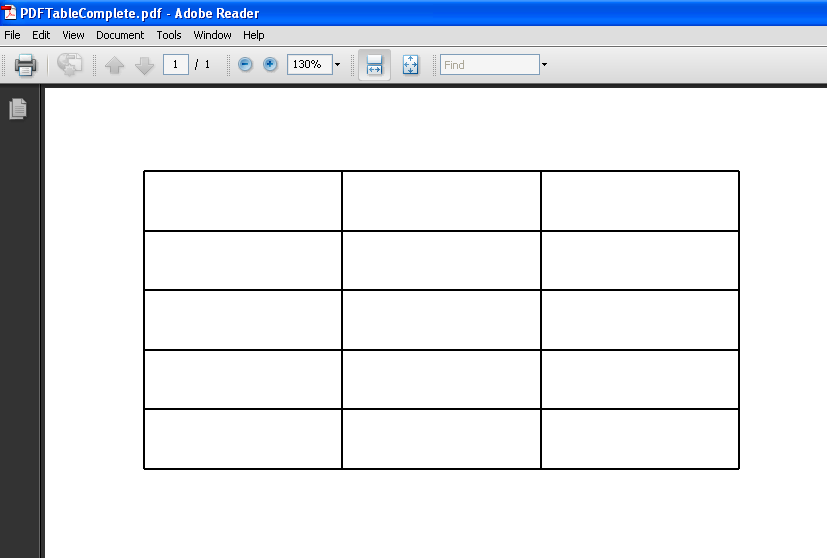
The following code is used to Create a Table in PDF with 5 Rows and 3 Columns.


/*
 * Author : Ajith Moni
 * Date : June 6th 2011
 */
import java.io.IOException;

import org.apache.pdfbox.exceptions.COSVisitorException;
import org.apache.pdfbox.pdmodel.PDDocument;
import org.apache.pdfbox.pdmodel.PDPage;
import org.apache.pdfbox.pdmodel.edit.PDPageContentStream;
import org.apache.pdfbox.pdmodel.font.PDFont;
import org.apache.pdfbox.pdmodel.font.PDType1Font;


public class PDFTableComplete {

    public static void main(String[] args)
            throws IOException, COSVisitorException {
       
        // Create the PDF Document
        PDDocument document =new PDDocument();
        // Create a Page of the PDF Document
        PDPage page1=new PDPage();
        // Add the created page to the PDF Document
        document.addPage( page1 );
       
        // Set Font Type
        PDFont font = PDType1Font.HELVETICA_BOLD;
       
        // Create a Stream for the Document and page
        PDPageContentStream contentStream = new PDPageContentStream(document, page1);
       
        // Begin Text
        contentStream.beginText();
        // The X and Y co-ordinates start from the end of the page
        // Use the following methods to get the results -
        // might vary on your machine.
        // 612.0
        // 792.0
        System.out.println(page1.getArtBox().getUpperRightX());
        System.out.println(page1.getArtBox().getUpperRightY());
       
        // Margin of the Document - X Value
        int margin=50;
       
        // Max val - 792 - Set Margin from top - Y Value
        int y1=750;
        int y2=750;
       
        // Dimensions of the cell to draw
        // length  - length of the line
        // breadth - height of the cell
        int length=100; 
        int breadth=30;


            // For Each Column Draw the length and Width
            for(int cols=0;cols<3;cols++)
            {
                // draw length line
                // draw breadth
               
                // draw rows
                for(int rows=0;rows<5;rows++)
                {
                    // draw the horizontal lines
                    contentStream.drawLine(margin, y1, margin+length, y2);
                    // breadth
                    contentStream.drawLine(margin, y1, margin, y1-breadth);
                    contentStream.drawLine(margin+length, y1, margin+length, y2-breadth);
                    y2-=breadth;
                    y1=y2;
                }
                contentStream.drawLine(margin, y1, margin+length, y2);
                margin=margin+length;
                y1=y2=750;
            }
       

                // Close the Text
                contentStream.endText();

                // Closing the Connection is Important
                // especially when using multiple pages
                contentStream.close();
       
        document.save("D:\\Trash\\PDFTableComplete.pdf");
       
        document.close();   


    }
   
}

Sunday, June 5, 2011

Create a Table Data into Cell in PDF

Now that i have been able to create text into the document. I thought entering Table Data into PDF could be of more help.

Just in Case You missed out the related article, you can check it out here
http://www.javaapionline.com/2011/06/create-pdf-document-using-java-pdfbox.html

Writing the entire code for creating Table like data Could be too complex to understand, so I have narrowed down the problem such that
  • I create a single cell in a PDF document and display text within the cell. You could extend and advance the logic to fit it to your needs.

/*
 * Author : Ajith Moni
 * Date : June 5th 2011
 */
import java.io.IOException;

import org.apache.pdfbox.exceptions.COSVisitorException;
import org.apache.pdfbox.pdmodel.PDDocument;
import org.apache.pdfbox.pdmodel.PDPage;
import org.apache.pdfbox.pdmodel.edit.PDPageContentStream;
import org.apache.pdfbox.pdmodel.font.PDFont;
import org.apache.pdfbox.pdmodel.font.PDType1Font;


public class PDFTest1 {

    public static void main(String[] args)
            throws IOException, COSVisitorException {
       
        // Create the PDF Document
        PDDocument document =new PDDocument();
        // Create a Page of the PDF Document
        PDPage page1=new PDPage();
        // Add the created page to the PDF Document
        document.addPage( page1 );
       
        // Set Font Type
        PDFont font = PDType1Font.HELVETICA_BOLD;
       
        // Create a Stream for the Document and page
        PDPageContentStream contentStream = new PDPageContentStream(document, page1);
       
        // Begin Text
        contentStream.beginText();
        // The X and Y co-ordinates start from the end of the page
        // Use the following methods to get the results -
        // might vary on your machine.
        // 612.0
        // 792.0
        System.out.println(page1.getArtBox().getUpperRightX());
        System.out.println(page1.getArtBox().getUpperRightY());
       
        // Margin of the Document - X Value
        int margin=50;
       
        // Max val - 792 - Set Margin from top - Y Value
        int y1=750;
        int y2=750;
       
        // Dimensions of the cell to draw
        // length  - length of the line
        // breadth - height of the cell
        int length=100; 
        int breadth=50;
       
           
        // draw from left to right
        // ______________
       
        contentStream.drawLine(margin, y1, margin+length, y2);
       
        //draw from right to down - using breadth of rectangle
        //    ______________
        //                                |
       
        contentStream.drawLine(margin+length, y2, margin+length, y2-breadth);
        //draw line from left to right
        //    ______________
        //    ______________|
       
        contentStream.drawLine(margin,y1-breadth,margin+length,y2-breadth);
        // draw line from the remaining line
        //     ______________
        //    |______________|
        contentStream.drawLine(margin, y1, margin, y2-breadth);
   
       
        /*
         *  Draw text within the cell
         *  int length=100;
         *  int breadth=50;
         */
        // Setting Font is very important, else the text will not be displayed.
        contentStream.setFont(PDType1Font.HELVETICA_BOLD,12);
        contentStream.moveTextPositionByAmount(margin+30, y1-30);
        contentStream.drawString("Text");
        // Close the Text
        contentStream.endText();

        // Closing the Connection is Important
        // especially when using multiple pages
        contentStream.close();

        document.save("D:\\Trash\\PDFTableCell.pdf");
       
        document.close();   


    }
   
}

Create a PDF Document using Java PDFbox

Weekend Time,  Scratching my head to learn something new.
I'm glad I did something at least i feel i have. :-)

Something was in my head, what if i need to code to create a PDF document at some point in my life ???

I was aware of Apache's POI being used to handle Excel Sheets, tried a sample script then thought what if i need to create a pdf file.

I am glad i tried it. Okay, lets get on with why we are or rather why you are here.
Check Out :   Apache PDFBox

Download link for the jar file :  http://pdfbox.apache.org/download.html

I downloaded the version pdfbox-app-1.5.0.jar. Please always download a stable download, avoids we being testers where you expecting things to work for first time. You would not be wanting to do a QA job right ;-) especially when it's someone else's product.

Java Development Environment :

I Choose Eclipse, it makes my work simple. I strongly suggest readers to use the same, saves a lot of time researching how stuff works ( avoids the ant and stuff that scare you over the net).


  • Create a New Project named "PDF Test"
  • In the Package Explorer, Right Click > Properties
  • Go to Java Build Path
  • Select Libraries Tab
  • Click on "Add External Jars"

Lets say you have saved your jar  pdfbox-app-1.5.0.jar at location D:\Jars\pdfbox-app-1.5.0.jar
Browse and select the jar.

Click Okay.
You are good to go.

Now Create a Sample Java file as follows. I've named it PDFTest


import java.io.IOException;

import org.apache.pdfbox.exceptions.COSVisitorException;
import org.apache.pdfbox.pdmodel.PDDocument;
import org.apache.pdfbox.pdmodel.PDPage;
import org.apache.pdfbox.pdmodel.edit.PDPageContentStream;
import org.apache.pdfbox.pdmodel.font.PDFont;
import org.apache.pdfbox.pdmodel.font.PDType1Font;


public class PDFTest {

    public static void main(String[] args) throws IOException, COSVisitorException {
       
       
        PDDocument document =new PDDocument();
       
        PDPage page = new PDPage();
        document.addPage( page );
       
        PDFont font = PDType1Font.HELVETICA_BOLD;
        PDPageContentStream contentStream = new PDPageContentStream(document, page);
       
        contentStream.beginText();
        contentStream.setFont( font, 12 );
        //contentStream.moveTextPositionByAmount( 0, 700 );
        contentStream.moveTextPositionByAmount( 10, 700 );
        contentStream.drawString( "Hello World" );
        contentStream.endText();
        contentStream.close();

        document.save("D:\\BlankPage.pdf");
       
        document.close();
        document.close();


    }
}


You can view the file under the D drive in the above mentioned example.

I hope this gives a confidence boost that at least you can print a Hello World into a PDF file before exploring it further.

I tried extending to create table like data, so I've taken a sample version of it to create a Single Cell with Value in it.

http://www.javaapionline.com/2011/06/create-table-data-into-cell-in-pdf.html
Ciao for now
Regards,
Ajith Moni

Monday, May 16, 2011

Lovely Wedding Song & performance

I loved every bit of it ... I wish I wish I'll be able to do so when i get married

Java IO - File Size

package file_space;
import java.io.*;
public class file_size {


public long file_size_bytes(long file_size)
{
return (long) (file_size);
}

public long file_size_KB(long file_size)
{
return (file_size/1024);
}

public long file_size_MB(long file_size)
{
return (file_size/1024/1024);
}

public long file_size_GB(long file_size)
{
return (file_size/1024/1024/1024);
}

public static void sop(Object str)
{
System.out.println("File Size on Drive is "+str);
}
public static void main(String args[])
{
File file=new File("files/file_txt.txt");
//System.out.println(file.exists());
//System.out.println(file.getAbsolutePath());

//Long bytes=file.length();
Long bytes=file.getFreeSpace();
file_size fs=new file_size();

sop(fs.file_size_bytes(bytes)+" Bytes");
sop(fs.file_size_KB(bytes)+" KB");
sop(fs.file_size_MB(bytes)+" MB");
sop(fs.file_size_GB(bytes)+" GB");

}


}

Saturday, May 14, 2011

What is a test case?

Test Case


The very word "testcase" to a lay person could be expanded as "Testing" a "Case".
A Case is an occurrence of sequence of steps leading to an observation(output).

Testing is synonymous with verification and validation of the outcome of the sequence of steps.

Putting together these two definitions, we can further simplify and elaborate test case as
"A sequence of steps that performed leads to an observation that needs to be verified for its validity".


Test Case is a term coined by the field of Software Engineering. Its purpose is to drill down to a simpler units of tests. You could check for the definition defined by wikipedia over here


Example :

When you to a pharmacy to buy a drug(medicine), you verify the M.R.P(Maximum Retail Price) and the Expiry Date of the drug(medicine) purchased.

Test Cases for a Drug purchased would then look like :
1) Verify that the Selling Price of the Drug by the pharmacy <= M.R.P of the drug being sold
2) Verify that the Date of Expiry is lesser than today's date.

Saturday, April 23, 2011

As we gather in this place today - Don Moen

As we gather in this place today
Holyspirit come and have your way
Have your way
As we lay aside our own desires
Sweep across our hearts with Holy fire
Have your way


chorus:
This is your house your home
We welcome you Lord we welcome you
This is your house your home
We welcome you today

As we offer up our hearts and lives
Let them be a living sacrifice
Have your way
Be glorified in everything you do
Be glorified in everything we say
Have your way

This is your house your home
We welcome you Lord we welcome you
This is you House your home
We welcom you today
As we pray Oh Lord draw near
It's your voice we long to hear

Lord have mercy - Easter - You were sent to heal the contrite

You were sent to heal the contrite,
Lord have mercy(2)

Lo-ord have on us Lord have mercy

You came to call the sinners too, Christ have mercy (2)

Chri-i-ist have mercy
Christ have mercy

You plead for us at the right hand, the right hand of god

Lord have mercy
Lord have mercy

Lord god have mercy
Lord have mercy on us
Lord have mercy

Lord Have mercy on us - Easter Songs

You were sent to heal the contrite:
Lord, have mercy.
Lord, have mercy on us.

You came to call sinners:
Christ, have mercy.
Christ, have mercy on us.

You plead for us at the right hand of the Father:
Lord, have mercy. Lord, have mercy.
Lord, have mercy on us.

Courtesy : http://www.spiritandsong.com/compositions/16552

Praise my soul - Easter Song - Gloria

Praise my soul the might king of heaven tribute to him bring
ransomed healed restored and all forgiven praise to him now sing

chorus:
then glory to our king sing all ye joyful strain
out voice will ever ring for his saving love form ne

praise him for his grace and for his favour when you were distressed
praise him still the same and sing forever may his name be blessed

father like he loves and ever spares us weak we are he knows
in his hands he ever gently bears us keeps us from our foes.

angels hel us rightly to adore him whilst you see his face
sun and moon and earth now bow before him praise him time and space

Quote for the day

  • Don't try to fix people, just love them. Loving is what people need the most.

Thursday, April 21, 2011

QTP : Example of Compare Text using InStr

Example of Compare Text for InStr
' Returns position 6
MsgBox InStr(1,"Moni Ajith Kumar","Ajith")

' Returns position 0 -
MsgBox InStr(7,"Moni Ajith Kumar","Ajith")

QTP : InStr with vbTextCompare vbBinaryCompare

Example Set 2: - String -"Todays India" Find the value "in"
' Position Value is 8 for "in"
MsgBox "Position of ""in"" is "& Instr(1,"Todays India","in",vbTextCompare)

' Returns Position Value 8
MsgBox "Position of ""In"" is "& Instr(1,"Todays India","In",vbTextCompare)

' Returns Position Value 0
MsgBox "Position of ""in"" is "& Instr(1,"Todays India","in",vbBinaryCompare)

' Returns Position Value 8
MsgBox "Position of ""In"" is "& Instr(1,"Todays India","In",vbBinaryCompare)

Example Set 2: Change Start position of Compare Text
' Returns 6
MsgBox InStr(1,"Moni Ajith Kumar","Ajith")
' Returns 0 -
MsgBox InStr(7,"Moni Ajith Kumar","Ajith")

QTP Find the Position of a String

'Find Position of the String "is" in a sentence

v_input_string="The Request is 123456"
v_text_to_find="is"

' Store the position
v_pos=InStr(1,v_input_string,v_text_to_find)

MsgBox "Position of the String ""is"" is : "&v_pos

MsgBox "Position of ""in"" is"& Instr(1,"Todays Developing India","In")


OutPut:

Position of the String "is" is 13
Position of "in" is 19

Wednesday, April 20, 2011

QTP Count the number of links in a page

' Get The Object
Set htmlObjCol_l=Browser("Oracle Applications Home").Page("Login").Object.links

' Count
Dim i
i=0

For each  element in htmlObjCol_l
    ' HTML Anchor element
    'MsgBox typename(element)
    'MsgBox typename(element.toString())
    MsgBox element
    'MsgBox element.toString()
     'MsgBox element.Name
    'Print to the Report
    Reporter.ReportEvent micPass,"Link : "&i,""&element.toString()&vbCrLf&vbCrLF&element.Name
    i=i+1   
Next
MsgBox "No of Links "&i

QTP Count the Number of Open Browser Sessions

QTP Count the Number of Open Browser Sessions

' Create a Description Object

Dim iDesc

Set iDesc = Description.Create

' Assign the micclass Property
iDesc("micclass").value="browser"

'Get the child objects using getChildObjects
Set iObj = Desktop.ChildObjects(iDesc)

'Displays the count
MsgBox iObj.Count

QTP : GetTOProperties of Image Object

'Image
Set Img=Browser("Login").Page("Login").Image("American English")
Set tImg=Img.GetTOProperties()
MsgBox typename(tImg)
icount=tImg.Count-1

For i=0 to icount
 sName=tImg(i).Name
 sValue=tImg(i).Value
 Reporter.ReportEvent micPass,"Property:="&sName&"Value :="&sValue,""

Next

QTP GetTOProperties for Page Object

Set Pg=Browser("Login").Page("Login")
MsgBox typename(Pg)
Set toPg=Pg.GetTOProperties()

'Dim i,icount
icount=toPg.Count-1

For i=0 to iCount
     sName=toPg(i).Name
     sValue=toPg(i).Value
 Reporter.ReportEvent micPass,"Property:=" & sName & " Value :="&sValue,""
Next

QTP Get the Properties for Browser Object

'Get the Properties for Browser Object

Set br=Browser("Login")
Set toBr=br.GetTOProperties()
'Dim i,icount
icount=toBr.Count-1


For i=0 to iCount
     sName=toBr(i).Name
     sValue=toBr(i).Value
 Reporter.ReportEvent micPass,"Property:=" & sName & " Value :="&sValue,""
Next

QTP : GetTOProperties of Web Edit Object

' Program to get the Test Object Properties of a Web Edit Field
' Assumption:Objects are already learned into the Object Repository

Set we=Browser("Login").Page("Login").WebEdit("usernameField")
Set toProps=we.GetTOProperties()


Dim i,icount
icount=TOProps.Count-1
For i=0 to iCount
     sName=TOProps(i).Name
     sValue=TOProps(i).Value
 Reporter.ReportEvent micPass,"Property:=" & sName & " Value :="&sValue,""
Next

Output :

Property :=type Value :=text
Property :=name Value :=usernameField
Property :=micclass Value :=WebEdit
Property :=html tag Value :=INPUT

Tuesday, April 19, 2011

QTP : Create a text file using File System Object

'Create a file system object
Set fso=createObject("Scripting.FileSystemObject")

'Create a file over the file system object -
' Parameters -
' 1 - Path of the object
' 2 - True - denotes overwrite the file if it exists
set file1=fso.CreateTextFile("C:\test.txt",True)

' Write the text into the file
 file1.write("hello world");

' file 1 is a TextStream Object
' Close the file
file1.close