It's been over three months since I've opened my blog to review my Personal life.
A lot has changed and I realise its for the good.
A change in Career has made me explain and explore my life.
Today, I took time out to blog myself out.
Lifes pretty much ended the same way it was before I tried to Change my life.
I end up being bored the same way I was three months back.
I've gained a lot with the change but lost my good old life.
Today is the day I break my shakkles and regain the good old life again ...!
One liner Stress buster for the day ends with the note
"Driving your point inn and trying to be good to everyone is touch task and ask. You ultimately end up being the culprit or rather looser."
Friday, November 18, 2011


Sunday, June 26, 2011
Find IP Address of a machine using Java (java.net)
Code to Find the IP Address of a local machine or any website on the network
import java.io.IOException;
import java.net.*;
public class Network {
/**
* @param args
* @throws IOException
*/
public static void main(String[] args) throws IOException {
// TODO Auto-generated method stub
// Get Hostname of the local machine
sop("Local Host Name"+InetAddress.getLocalHost());
//Get IP of google.co.in
//Get IP of google.com
sop("IP of website google.co.in : "+InetAddress.getByName("google.co.in"));
sop("IP of website google.com : "+InetAddress.getByName("google.com"));
sop("IP address of my website "+InetAddress.getByName("javaapionline.com"));
// Google has multiple IPs. To List all the IP's use getAllByName
InetAddress SW[] = InetAddress.getAllByName("www.google.com");
for (int i=0; i
System.out.println(SW[i]);
// Google - Sites - Using Instance of Address
// Access hostname or host address
InetAddress Address = InetAddress.getByName("google.com");
sop("Google Host Name : "+Address.getHostName());
sop("Google Host Address : "+Address.getHostAddress());
}
public static void sop(String b)
{
System.out.println(b);
}
public static void sop(boolean b)
{
System.out.println(b);
}
}
--------------------------------------------------------------------------------
Sample Output ( Could Vary on your machine )
Local Host Name : xxx-xxx/124.123.161.188
IP of website google.co.in : google.co.in/74.125.236.49
IP of website google.com : google.com/74.125.236.51
IP address of my website javaapionline.com/38.101.213.236
www.google.com/74.125.236.48
www.google.com/74.125.236.49
www.google.com/74.125.236.50
www.google.com/74.125.236.52
www.google.com/74.125.236.51
Google Host Name : google.com
Google Host Address74.125.236.51
import java.io.IOException;
import java.net.*;
public class Network {
/**
* @param args
* @throws IOException
*/
public static void main(String[] args) throws IOException {
// TODO Auto-generated method stub
// Get Hostname of the local machine
sop("Local Host Name"+InetAddress.getLocalHost());
//Get IP of google.co.in
//Get IP of google.com
sop("IP of website google.co.in : "+InetAddress.getByName("google.co.in"));
sop("IP of website google.com : "+InetAddress.getByName("google.com"));
sop("IP address of my website "+InetAddress.getByName("javaapionline.com"));
// Google has multiple IPs. To List all the IP's use getAllByName
InetAddress SW[] = InetAddress.getAllByName("www.google.com");
for (int i=0; i
System.out.println(SW[i]);
// Google - Sites - Using Instance of Address
// Access hostname or host address
InetAddress Address = InetAddress.getByName("google.com");
sop("Google Host Name : "+Address.getHostName());
sop("Google Host Address : "+Address.getHostAddress());
}
public static void sop(String b)
{
System.out.println(b);
}
public static void sop(boolean b)
{
System.out.println(b);
}
}
--------------------------------------------------------------------------------
Sample Output ( Could Vary on your machine )
Local Host Name : xxx-xxx/124.123.161.188
IP of website google.co.in : google.co.in/74.125.236.49
IP of website google.com : google.com/74.125.236.51
IP address of my website javaapionline.com/38.101.213.236
www.google.com/74.125.236.48
www.google.com/74.125.236.49
www.google.com/74.125.236.50
www.google.com/74.125.236.52
www.google.com/74.125.236.51
Google Host Name : google.com
Google Host Address74.125.236.51
Monday, June 6, 2011
Create 5 Table Cell Data in Single Column in a PDF File
Jar : PDFBox from Apache
http://www.javaapionline.com/2011/06/create-pdf-document-using-java-pdfbox.html
An Extension to the earlier program.
Create 5 Rows of Data Cells
 I decided to add in 5 Cells in a Single Column
Here's how the code will look.
/*
* Author : Ajith Moni
* Date : June 6th 2011
*/
import java.io.IOException;
import org.apache.pdfbox.exceptions.COSVisitorException;
import org.apache.pdfbox.pdmodel.PDDocument;
import org.apache.pdfbox.pdmodel.PDPage;
import org.apache.pdfbox.pdmodel.edit.PDPageContentStream;
import org.apache.pdfbox.pdmodel.font.PDFont;
import org.apache.pdfbox.pdmodel.font.PDType1Font;
public class PDFTableSingleColumn {
public static void main(String[] args)
throws IOException, COSVisitorException {
// Create the PDF Document
PDDocument document =new PDDocument();
// Create a Page of the PDF Document
PDPage page1=new PDPage();
// Add the created page to the PDF Document
document.addPage( page1 );
// Set Font Type
PDFont font = PDType1Font.HELVETICA_BOLD;
// Create a Stream for the Document and page
PDPageContentStream contentStream = new PDPageContentStream(document, page1);
// Begin Text
contentStream.beginText();
// The X and Y co-ordinates start from the end of the page
// Use the following methods to get the results -
// might vary on your machine.
// 612.0
// 792.0
System.out.println(page1.getArtBox().getUpperRightX());
System.out.println(page1.getArtBox().getUpperRightY());
// Margin of the Document - X Value
int margin=50;
// Max val - 792 - Set Margin from top - Y Value
int y1=750;
int y2=750;
// Dimensions of the cell to draw
// length - length of the line
// breadth - height of the cell
int length=100;
int breadth=30;
// draw 5 cells having single column
for(int rows=0;rows<5;rows++)
{
// draw the horizontal lines
contentStream.drawLine(margin, y1, margin+length, y2);
// breadth
contentStream.drawLine(margin, y1, margin, y1-breadth);
contentStream.drawLine(margin+length, y1, margin+length, y2-breadth);
y2-=breadth;
y1=y2;
}
// Draw the closing of the Cell
contentStream.drawLine(margin, y1, margin+length, y2);
// Close the Text
contentStream.endText();
// Closing the Connection is Important
// especially when using multiple pages
contentStream.close();
document.save("D:\\Trash\\PDFTableSingleColumn.pdf");
document.close();
}
}
For Creating a Compelete Table with N Rows and N columns, See the Article :
http://www.javaapionline.com/2011/06/create-table-with-rows-and-columns-in.html
Also Read :
http://www.javaapionline.com/2011/06/create-pdf-document-using-java-pdfbox.html
An Extension to the earlier program.
Create 5 Rows of Data Cells

Here's how the code will look.
/*
* Author : Ajith Moni
* Date : June 6th 2011
*/
import java.io.IOException;
import org.apache.pdfbox.exceptions.COSVisitorException;
import org.apache.pdfbox.pdmodel.PDDocument;
import org.apache.pdfbox.pdmodel.PDPage;
import org.apache.pdfbox.pdmodel.edit.PDPageContentStream;
import org.apache.pdfbox.pdmodel.font.PDFont;
import org.apache.pdfbox.pdmodel.font.PDType1Font;
public class PDFTableSingleColumn {
public static void main(String[] args)
throws IOException, COSVisitorException {
// Create the PDF Document
PDDocument document =new PDDocument();
// Create a Page of the PDF Document
PDPage page1=new PDPage();
// Add the created page to the PDF Document
document.addPage( page1 );
// Set Font Type
PDFont font = PDType1Font.HELVETICA_BOLD;
// Create a Stream for the Document and page
PDPageContentStream contentStream = new PDPageContentStream(document, page1);
// Begin Text
contentStream.beginText();
// The X and Y co-ordinates start from the end of the page
// Use the following methods to get the results -
// might vary on your machine.
// 612.0
// 792.0
System.out.println(page1.getArtBox().getUpperRightX());
System.out.println(page1.getArtBox().getUpperRightY());
// Margin of the Document - X Value
int margin=50;
// Max val - 792 - Set Margin from top - Y Value
int y1=750;
int y2=750;
// Dimensions of the cell to draw
// length - length of the line
// breadth - height of the cell
int length=100;
int breadth=30;
// draw 5 cells having single column
for(int rows=0;rows<5;rows++)
{
// draw the horizontal lines
contentStream.drawLine(margin, y1, margin+length, y2);
// breadth
contentStream.drawLine(margin, y1, margin, y1-breadth);
contentStream.drawLine(margin+length, y1, margin+length, y2-breadth);
y2-=breadth;
y1=y2;
}
// Draw the closing of the Cell
contentStream.drawLine(margin, y1, margin+length, y2);
// Close the Text
contentStream.endText();
// Closing the Connection is Important
// especially when using multiple pages
contentStream.close();
document.save("D:\\Trash\\PDFTableSingleColumn.pdf");
document.close();
}
}
For Creating a Compelete Table with N Rows and N columns, See the Article :
http://www.javaapionline.com/2011/06/create-table-with-rows-and-columns-in.html
Also Read :
Create Table with Rows and Columns in a PDF File
Jar Used : PDFBox from Apache
http://www.javaapionline.com/2011/06/create-pdf-document-using-java-pdfbox.html
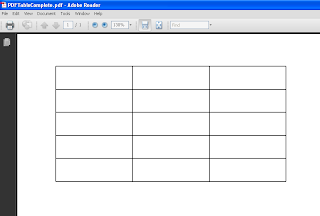
The following code is used to Create a Table in PDF with 5 Rows and 3 Columns.
/*
* Author : Ajith Moni
* Date : June 6th 2011
*/
import java.io.IOException;
import org.apache.pdfbox.exceptions.COSVisitorException;
import org.apache.pdfbox.pdmodel.PDDocument;
import org.apache.pdfbox.pdmodel.PDPage;
import org.apache.pdfbox.pdmodel.edit.PDPageContentStream;
import org.apache.pdfbox.pdmodel.font.PDFont;
import org.apache.pdfbox.pdmodel.font.PDType1Font;
public class PDFTableComplete {
public static void main(String[] args)
throws IOException, COSVisitorException {
// Create the PDF Document
PDDocument document =new PDDocument();
// Create a Page of the PDF Document
PDPage page1=new PDPage();
// Add the created page to the PDF Document
document.addPage( page1 );
// Set Font Type
PDFont font = PDType1Font.HELVETICA_BOLD;
// Create a Stream for the Document and page
PDPageContentStream contentStream = new PDPageContentStream(document, page1);
// Begin Text
contentStream.beginText();
// The X and Y co-ordinates start from the end of the page
// Use the following methods to get the results -
// might vary on your machine.
// 612.0
// 792.0
System.out.println(page1.getArtBox().getUpperRightX());
System.out.println(page1.getArtBox().getUpperRightY());
// Margin of the Document - X Value
int margin=50;
// Max val - 792 - Set Margin from top - Y Value
int y1=750;
int y2=750;
// Dimensions of the cell to draw
// length - length of the line
// breadth - height of the cell
int length=100;
int breadth=30;
// For Each Column Draw the length and Width
for(int cols=0;cols<3;cols++)
{
// draw length line
// draw breadth
// draw rows
for(int rows=0;rows<5;rows++)
{
// draw the horizontal lines
contentStream.drawLine(margin, y1, margin+length, y2);
// breadth
contentStream.drawLine(margin, y1, margin, y1-breadth);
contentStream.drawLine(margin+length, y1, margin+length, y2-breadth);
y2-=breadth;
y1=y2;
}
contentStream.drawLine(margin, y1, margin+length, y2);
margin=margin+length;
y1=y2=750;
}
// Close the Text
contentStream.endText();
// Closing the Connection is Important
// especially when using multiple pages
contentStream.close();
document.save("D:\\Trash\\PDFTableComplete.pdf");
document.close();
}
}
http://www.javaapionline.com/2011/06/create-pdf-document-using-java-pdfbox.html
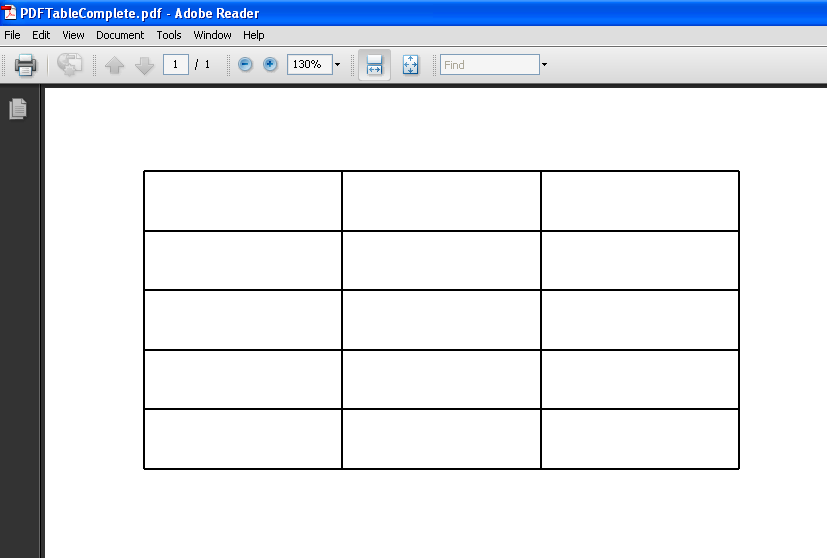
The following code is used to Create a Table in PDF with 5 Rows and 3 Columns.
/*
* Author : Ajith Moni
* Date : June 6th 2011
*/
import java.io.IOException;
import org.apache.pdfbox.exceptions.COSVisitorException;
import org.apache.pdfbox.pdmodel.PDDocument;
import org.apache.pdfbox.pdmodel.PDPage;
import org.apache.pdfbox.pdmodel.edit.PDPageContentStream;
import org.apache.pdfbox.pdmodel.font.PDFont;
import org.apache.pdfbox.pdmodel.font.PDType1Font;
public class PDFTableComplete {
public static void main(String[] args)
throws IOException, COSVisitorException {
// Create the PDF Document
PDDocument document =new PDDocument();
// Create a Page of the PDF Document
PDPage page1=new PDPage();
// Add the created page to the PDF Document
document.addPage( page1 );
// Set Font Type
PDFont font = PDType1Font.HELVETICA_BOLD;
// Create a Stream for the Document and page
PDPageContentStream contentStream = new PDPageContentStream(document, page1);
// Begin Text
contentStream.beginText();
// The X and Y co-ordinates start from the end of the page
// Use the following methods to get the results -
// might vary on your machine.
// 612.0
// 792.0
System.out.println(page1.getArtBox().getUpperRightX());
System.out.println(page1.getArtBox().getUpperRightY());
// Margin of the Document - X Value
int margin=50;
// Max val - 792 - Set Margin from top - Y Value
int y1=750;
int y2=750;
// Dimensions of the cell to draw
// length - length of the line
// breadth - height of the cell
int length=100;
int breadth=30;
// For Each Column Draw the length and Width
for(int cols=0;cols<3;cols++)
{
// draw length line
// draw breadth
// draw rows
for(int rows=0;rows<5;rows++)
{
// draw the horizontal lines
contentStream.drawLine(margin, y1, margin+length, y2);
// breadth
contentStream.drawLine(margin, y1, margin, y1-breadth);
contentStream.drawLine(margin+length, y1, margin+length, y2-breadth);
y2-=breadth;
y1=y2;
}
contentStream.drawLine(margin, y1, margin+length, y2);
margin=margin+length;
y1=y2=750;
}
// Close the Text
contentStream.endText();
// Closing the Connection is Important
// especially when using multiple pages
contentStream.close();
document.save("D:\\Trash\\PDFTableComplete.pdf");
document.close();
}
}
Sunday, June 5, 2011
Create a Table Data into Cell in PDF
Now that i have been able to create text into the document. I thought entering Table Data into PDF could be of more help.
Just in Case You missed out the related article, you can check it out here
http://www.javaapionline.com/2011/06/create-pdf-document-using-java-pdfbox.html
Writing the entire code for creating Table like data Could be too complex to understand, so I have narrowed down the problem such that
/*
* Author : Ajith Moni
* Date : June 5th 2011
*/
import java.io.IOException;
import org.apache.pdfbox.exceptions.COSVisitorException;
import org.apache.pdfbox.pdmodel.PDDocument;
import org.apache.pdfbox.pdmodel.PDPage;
import org.apache.pdfbox.pdmodel.edit.PDPageContentStream;
import org.apache.pdfbox.pdmodel.font.PDFont;
import org.apache.pdfbox.pdmodel.font.PDType1Font;
public class PDFTest1 {
public static void main(String[] args)
throws IOException, COSVisitorException {
// Create the PDF Document
PDDocument document =new PDDocument();
// Create a Page of the PDF Document
PDPage page1=new PDPage();
// Add the created page to the PDF Document
document.addPage( page1 );
// Set Font Type
PDFont font = PDType1Font.HELVETICA_BOLD;
// Create a Stream for the Document and page
PDPageContentStream contentStream = new PDPageContentStream(document, page1);
// Begin Text
contentStream.beginText();
// The X and Y co-ordinates start from the end of the page
// Use the following methods to get the results -
// might vary on your machine.
// 612.0
// 792.0
System.out.println(page1.getArtBox().getUpperRightX());
System.out.println(page1.getArtBox().getUpperRightY());
// Margin of the Document - X Value
int margin=50;
// Max val - 792 - Set Margin from top - Y Value
int y1=750;
int y2=750;
// Dimensions of the cell to draw
// length - length of the line
// breadth - height of the cell
int length=100;
int breadth=50;
// draw from left to right
// ______________
contentStream.drawLine(margin, y1, margin+length, y2);
//draw from right to down - using breadth of rectangle
// ______________
// |
contentStream.drawLine(margin+length, y2, margin+length, y2-breadth);
//draw line from left to right
// ______________
// ______________|
contentStream.drawLine(margin,y1-breadth,margin+length,y2-breadth);
// draw line from the remaining line
// ______________
// |______________|
contentStream.drawLine(margin, y1, margin, y2-breadth);
/*
* Draw text within the cell
* int length=100;
* int breadth=50;
*/
// Setting Font is very important, else the text will not be displayed.
contentStream.setFont(PDType1Font.HELVETICA_BOLD,12);
contentStream.moveTextPositionByAmount(margin+30, y1-30);
contentStream.drawString("Text");
// Close the Text
contentStream.endText();
// Closing the Connection is Important
// especially when using multiple pages
contentStream.close();
document.save("D:\\Trash\\PDFTableCell.pdf");
document.close();
}
}
Just in Case You missed out the related article, you can check it out here
http://www.javaapionline.com/2011/06/create-pdf-document-using-java-pdfbox.html
Writing the entire code for creating Table like data Could be too complex to understand, so I have narrowed down the problem such that
- I create a single cell in a PDF document and display text within the cell. You could extend and advance the logic to fit it to your needs.
/*
* Author : Ajith Moni
* Date : June 5th 2011
*/
import java.io.IOException;
import org.apache.pdfbox.exceptions.COSVisitorException;
import org.apache.pdfbox.pdmodel.PDDocument;
import org.apache.pdfbox.pdmodel.PDPage;
import org.apache.pdfbox.pdmodel.edit.PDPageContentStream;
import org.apache.pdfbox.pdmodel.font.PDFont;
import org.apache.pdfbox.pdmodel.font.PDType1Font;
public class PDFTest1 {
public static void main(String[] args)
throws IOException, COSVisitorException {
// Create the PDF Document
PDDocument document =new PDDocument();
// Create a Page of the PDF Document
PDPage page1=new PDPage();
// Add the created page to the PDF Document
document.addPage( page1 );
// Set Font Type
PDFont font = PDType1Font.HELVETICA_BOLD;
// Create a Stream for the Document and page
PDPageContentStream contentStream = new PDPageContentStream(document, page1);
// Begin Text
contentStream.beginText();
// The X and Y co-ordinates start from the end of the page
// Use the following methods to get the results -
// might vary on your machine.
// 612.0
// 792.0
System.out.println(page1.getArtBox().getUpperRightX());
System.out.println(page1.getArtBox().getUpperRightY());
// Margin of the Document - X Value
int margin=50;
// Max val - 792 - Set Margin from top - Y Value
int y1=750;
int y2=750;
// Dimensions of the cell to draw
// length - length of the line
// breadth - height of the cell
int length=100;
int breadth=50;
// draw from left to right
// ______________
contentStream.drawLine(margin, y1, margin+length, y2);
//draw from right to down - using breadth of rectangle
// ______________
// |
contentStream.drawLine(margin+length, y2, margin+length, y2-breadth);
//draw line from left to right
// ______________
// ______________|
contentStream.drawLine(margin,y1-breadth,margin+length,y2-breadth);
// draw line from the remaining line
// ______________
// |______________|
contentStream.drawLine(margin, y1, margin, y2-breadth);
/*
* Draw text within the cell
* int length=100;
* int breadth=50;
*/
// Setting Font is very important, else the text will not be displayed.
contentStream.setFont(PDType1Font.HELVETICA_BOLD,12);
contentStream.moveTextPositionByAmount(margin+30, y1-30);
contentStream.drawString("Text");
// Close the Text
contentStream.endText();
// Closing the Connection is Important
// especially when using multiple pages
contentStream.close();
document.save("D:\\Trash\\PDFTableCell.pdf");
document.close();
}
}
Create a PDF Document using Java PDFbox
Weekend Time, Scratching my head to learn something new.
I'm glad I did something at least i feel i have. :-)
Something was in my head, what if i need to code to create a PDF document at some point in my life ???
I was aware of Apache's POI being used to handle Excel Sheets, tried a sample script then thought what if i need to create a pdf file.
I am glad i tried it. Okay, lets get on with why we are or rather why you are here.
Check Out : Apache PDFBox
Download link for the jar file : http://pdfbox.apache.org/download.html
I downloaded the version pdfbox-app-1.5.0.jar. Please always download a stable download, avoids we being testers where you expecting things to work for first time. You would not be wanting to do a QA job right ;-) especially when it's someone else's product.
Java Development Environment :
I Choose Eclipse, it makes my work simple. I strongly suggest readers to use the same, saves a lot of time researching how stuff works ( avoids the ant and stuff that scare you over the net).
Lets say you have saved your jar pdfbox-app-1.5.0.jar at location D:\Jars\pdfbox-app-1.5.0.jar
Browse and select the jar.
Click Okay.
You are good to go.
Now Create a Sample Java file as follows. I've named it PDFTest
import java.io.IOException;
import org.apache.pdfbox.exceptions.COSVisitorException;
import org.apache.pdfbox.pdmodel.PDDocument;
import org.apache.pdfbox.pdmodel.PDPage;
import org.apache.pdfbox.pdmodel.edit.PDPageContentStream;
import org.apache.pdfbox.pdmodel.font.PDFont;
import org.apache.pdfbox.pdmodel.font.PDType1Font;
public class PDFTest {
public static void main(String[] args) throws IOException, COSVisitorException {
PDDocument document =new PDDocument();
PDPage page = new PDPage();
document.addPage( page );
PDFont font = PDType1Font.HELVETICA_BOLD;
PDPageContentStream contentStream = new PDPageContentStream(document, page);
contentStream.beginText();
contentStream.setFont( font, 12 );
//contentStream.moveTextPositionByAmount( 0, 700 );
contentStream.moveTextPositionByAmount( 10, 700 );
contentStream.drawString( "Hello World" );
contentStream.endText();
contentStream.close();
document.save("D:\\BlankPage.pdf");
document.close();
document.close();
}
}
You can view the file under the D drive in the above mentioned example.
I hope this gives a confidence boost that at least you can print a Hello World into a PDF file before exploring it further.
I tried extending to create table like data, so I've taken a sample version of it to create a Single Cell with Value in it.
http://www.javaapionline.com/2011/06/create-table-data-into-cell-in-pdf.html
Ciao for now
Regards,
Ajith Moni
I'm glad I did something at least i feel i have. :-)
Something was in my head, what if i need to code to create a PDF document at some point in my life ???
I was aware of Apache's POI being used to handle Excel Sheets, tried a sample script then thought what if i need to create a pdf file.
I am glad i tried it. Okay, lets get on with why we are or rather why you are here.
Check Out : Apache PDFBox
Download link for the jar file : http://pdfbox.apache.org/download.html
I downloaded the version pdfbox-app-1.5.0.jar. Please always download a stable download, avoids we being testers where you expecting things to work for first time. You would not be wanting to do a QA job right ;-) especially when it's someone else's product.
Java Development Environment :
I Choose Eclipse, it makes my work simple. I strongly suggest readers to use the same, saves a lot of time researching how stuff works ( avoids the ant and stuff that scare you over the net).
- Create a New Project named "PDF Test"
- In the Package Explorer, Right Click > Properties
- Go to Java Build Path
- Select Libraries Tab
- Click on "Add External Jars"
Lets say you have saved your jar pdfbox-app-1.5.0.jar at location D:\Jars\pdfbox-app-1.5.0.jar
Browse and select the jar.
Click Okay.
You are good to go.
Now Create a Sample Java file as follows. I've named it PDFTest
import java.io.IOException;
import org.apache.pdfbox.exceptions.COSVisitorException;
import org.apache.pdfbox.pdmodel.PDDocument;
import org.apache.pdfbox.pdmodel.PDPage;
import org.apache.pdfbox.pdmodel.edit.PDPageContentStream;
import org.apache.pdfbox.pdmodel.font.PDFont;
import org.apache.pdfbox.pdmodel.font.PDType1Font;
public class PDFTest {
public static void main(String[] args) throws IOException, COSVisitorException {
PDDocument document =new PDDocument();
PDPage page = new PDPage();
document.addPage( page );
PDFont font = PDType1Font.HELVETICA_BOLD;
PDPageContentStream contentStream = new PDPageContentStream(document, page);
contentStream.beginText();
contentStream.setFont( font, 12 );
//contentStream.moveTextPositionByAmount( 0, 700 );
contentStream.moveTextPositionByAmount( 10, 700 );
contentStream.drawString( "Hello World" );
contentStream.endText();
contentStream.close();
document.save("D:\\BlankPage.pdf");
document.close();
document.close();
}
}
You can view the file under the D drive in the above mentioned example.
I hope this gives a confidence boost that at least you can print a Hello World into a PDF file before exploring it further.
I tried extending to create table like data, so I've taken a sample version of it to create a Single Cell with Value in it.
http://www.javaapionline.com/2011/06/create-table-data-into-cell-in-pdf.html
Ciao for now
Regards,
Ajith Moni
Monday, May 16, 2011
Lovely Wedding Song & performance
I loved every bit of it ... I wish I wish I'll be able to do so when i get married
Java IO - File Size
package file_space;
import java.io.*;
public class file_size {
public long file_size_bytes(long file_size)
{
return (long) (file_size);
}
public long file_size_KB(long file_size)
{
return (file_size/1024);
}
public long file_size_MB(long file_size)
{
return (file_size/1024/1024);
}
public long file_size_GB(long file_size)
{
return (file_size/1024/1024/1024);
}
public static void sop(Object str)
{
System.out.println("File Size on Drive is "+str);
}
public static void main(String args[])
{
File file=new File("files/file_txt.txt");
//System.out.println(file.exists());
//System.out.println(file.getAbsolutePath());
//Long bytes=file.length();
Long bytes=file.getFreeSpace();
file_size fs=new file_size();
sop(fs.file_size_bytes(bytes)+" Bytes");
sop(fs.file_size_KB(bytes)+" KB");
sop(fs.file_size_MB(bytes)+" MB");
sop(fs.file_size_GB(bytes)+" GB");
}
}
import java.io.*;
public class file_size {
public long file_size_bytes(long file_size)
{
return (long) (file_size);
}
public long file_size_KB(long file_size)
{
return (file_size/1024);
}
public long file_size_MB(long file_size)
{
return (file_size/1024/1024);
}
public long file_size_GB(long file_size)
{
return (file_size/1024/1024/1024);
}
public static void sop(Object str)
{
System.out.println("File Size on Drive is "+str);
}
public static void main(String args[])
{
File file=new File("files/file_txt.txt");
//System.out.println(file.exists());
//System.out.println(file.getAbsolutePath());
//Long bytes=file.length();
Long bytes=file.getFreeSpace();
file_size fs=new file_size();
sop(fs.file_size_bytes(bytes)+" Bytes");
sop(fs.file_size_KB(bytes)+" KB");
sop(fs.file_size_MB(bytes)+" MB");
sop(fs.file_size_GB(bytes)+" GB");
}
}
Saturday, May 14, 2011
What is a test case?
Test Case
The very word "testcase" to a lay person could be expanded as "Testing" a "Case".
A Case is an occurrence of sequence of steps leading to an observation(output).
Testing is synonymous with verification and validation of the outcome of the sequence of steps.
Putting together these two definitions, we can further simplify and elaborate test case as
"A sequence of steps that performed leads to an observation that needs to be verified for its validity".
Test Case is a term coined by the field of Software Engineering. Its purpose is to drill down to a simpler units of tests. You could check for the definition defined by wikipedia over here
Example :
When you to a pharmacy to buy a drug(medicine), you verify the M.R.P(Maximum Retail Price) and the Expiry Date of the drug(medicine) purchased.
Test Cases for a Drug purchased would then look like :
1) Verify that the Selling Price of the Drug by the pharmacy <= M.R.P of the drug being sold
2) Verify that the Date of Expiry is lesser than today's date.
The very word "testcase" to a lay person could be expanded as "Testing" a "Case".
A Case is an occurrence of sequence of steps leading to an observation(output).
Testing is synonymous with verification and validation of the outcome of the sequence of steps.
Putting together these two definitions, we can further simplify and elaborate test case as
"A sequence of steps that performed leads to an observation that needs to be verified for its validity".
Test Case is a term coined by the field of Software Engineering. Its purpose is to drill down to a simpler units of tests. You could check for the definition defined by wikipedia over here
Example :
When you to a pharmacy to buy a drug(medicine), you verify the M.R.P(Maximum Retail Price) and the Expiry Date of the drug(medicine) purchased.
Test Cases for a Drug purchased would then look like :
1) Verify that the Selling Price of the Drug by the pharmacy <= M.R.P of the drug being sold
2) Verify that the Date of Expiry is lesser than today's date.
Saturday, April 23, 2011
As we gather in this place today - Don Moen
As we gather in this place today
Holyspirit come and have your way
Have your way
As we lay aside our own desires
Sweep across our hearts with Holy fire
Have your way
chorus:
This is your house your home
We welcome you Lord we welcome you
This is your house your home
We welcome you today
As we offer up our hearts and lives
Let them be a living sacrifice
Have your way
Be glorified in everything you do
Be glorified in everything we say
Have your way
This is your house your home
We welcome you Lord we welcome you
This is you House your home
We welcom you today
As we pray Oh Lord draw near
It's your voice we long to hear
Holyspirit come and have your way
Have your way
As we lay aside our own desires
Sweep across our hearts with Holy fire
Have your way
chorus:
This is your house your home
We welcome you Lord we welcome you
This is your house your home
We welcome you today
As we offer up our hearts and lives
Let them be a living sacrifice
Have your way
Be glorified in everything you do
Be glorified in everything we say
Have your way
This is your house your home
We welcome you Lord we welcome you
This is you House your home
We welcom you today
As we pray Oh Lord draw near
It's your voice we long to hear
Lord have mercy - Easter - You were sent to heal the contrite
You were sent to heal the contrite,
Lord have mercy(2)
Lo-ord have on us Lord have mercy
You came to call the sinners too, Christ have mercy (2)
Chri-i-ist have mercy
Christ have mercy
You plead for us at the right hand, the right hand of god
Lord have mercy
Lord have mercy
Lord god have mercy
Lord have mercy on us
Lord have mercy
Lord have mercy(2)
Lo-ord have on us Lord have mercy
You came to call the sinners too, Christ have mercy (2)
Chri-i-ist have mercy
Christ have mercy
You plead for us at the right hand, the right hand of god
Lord have mercy
Lord have mercy
Lord god have mercy
Lord have mercy on us
Lord have mercy
Lord Have mercy on us - Easter Songs
You were sent to heal the contrite:
Lord, have mercy.
Lord, have mercy on us.
You came to call sinners:
Christ, have mercy.
Christ, have mercy on us.
You plead for us at the right hand of the Father:
Lord, have mercy. Lord, have mercy.
Lord, have mercy on us.
Courtesy : http://www.spiritandsong.com/compositions/16552
Lord, have mercy.
Lord, have mercy on us.
You came to call sinners:
Christ, have mercy.
Christ, have mercy on us.
You plead for us at the right hand of the Father:
Lord, have mercy. Lord, have mercy.
Lord, have mercy on us.
Courtesy : http://www.spiritandsong.com/compositions/16552
Praise my soul - Easter Song - Gloria
Praise my soul the might king of heaven tribute to him bring
ransomed healed restored and all forgiven praise to him now sing
chorus:
then glory to our king sing all ye joyful strain
out voice will ever ring for his saving love form ne
praise him for his grace and for his favour when you were distressed
praise him still the same and sing forever may his name be blessed
father like he loves and ever spares us weak we are he knows
in his hands he ever gently bears us keeps us from our foes.
angels hel us rightly to adore him whilst you see his face
sun and moon and earth now bow before him praise him time and space
ransomed healed restored and all forgiven praise to him now sing
chorus:
then glory to our king sing all ye joyful strain
out voice will ever ring for his saving love form ne
praise him for his grace and for his favour when you were distressed
praise him still the same and sing forever may his name be blessed
father like he loves and ever spares us weak we are he knows
in his hands he ever gently bears us keeps us from our foes.
angels hel us rightly to adore him whilst you see his face
sun and moon and earth now bow before him praise him time and space
Thursday, April 21, 2011
QTP : Example of Compare Text using InStr
Example of Compare Text for InStr
' Returns position 6
MsgBox InStr(1,"Moni Ajith Kumar","Ajith")
' Returns position 0 -
MsgBox InStr(7,"Moni Ajith Kumar","Ajith")
' Returns position 6
MsgBox InStr(1,"Moni Ajith Kumar","Ajith")
' Returns position 0 -
MsgBox InStr(7,"Moni Ajith Kumar","Ajith")
QTP : InStr with vbTextCompare vbBinaryCompare
Example Set 2: - String -"Todays India" Find the value "in"
' Position Value is 8 for "in"
MsgBox "Position of ""in"" is "& Instr(1,"Todays India","in",vbTextCompare)
' Returns Position Value 8
MsgBox "Position of ""In"" is "& Instr(1,"Todays India","In",vbTextCompare)
' Returns Position Value 0
MsgBox "Position of ""in"" is "& Instr(1,"Todays India","in",vbBinaryCompare)
' Returns Position Value 8
MsgBox "Position of ""In"" is "& Instr(1,"Todays India","In",vbBinaryCompare)
Example Set 2: Change Start position of Compare Text
' Returns 6
MsgBox InStr(1,"Moni Ajith Kumar","Ajith")
' Returns 0 -
MsgBox InStr(7,"Moni Ajith Kumar","Ajith")
' Position Value is 8 for "in"
MsgBox "Position of ""in"" is "& Instr(1,"Todays India","in",vbTextCompare)
' Returns Position Value 8
MsgBox "Position of ""In"" is "& Instr(1,"Todays India","In",vbTextCompare)
' Returns Position Value 0
MsgBox "Position of ""in"" is "& Instr(1,"Todays India","in",vbBinaryCompare)
' Returns Position Value 8
MsgBox "Position of ""In"" is "& Instr(1,"Todays India","In",vbBinaryCompare)
Example Set 2: Change Start position of Compare Text
' Returns 6
MsgBox InStr(1,"Moni Ajith Kumar","Ajith")
' Returns 0 -
MsgBox InStr(7,"Moni Ajith Kumar","Ajith")
QTP Find the Position of a String
'Find Position of the String "is" in a sentence
v_input_string="The Request is 123456"
v_text_to_find="is"
' Store the position
v_pos=InStr(1,v_input_string,v_text_to_find)
MsgBox "Position of the String ""is"" is : "&v_pos
MsgBox "Position of ""in"" is"& Instr(1,"Todays Developing India","In")
OutPut:
Position of the String "is" is 13
Position of "in" is 19
v_input_string="The Request is 123456"
v_text_to_find="is"
' Store the position
v_pos=InStr(1,v_input_string,v_text_to_find)
MsgBox "Position of the String ""is"" is : "&v_pos
MsgBox "Position of ""in"" is"& Instr(1,"Todays Developing India","In")
OutPut:
Position of the String "is" is 13
Position of "in" is 19
Wednesday, April 20, 2011
QTP Count the number of links in a page
' Get The Object
Set htmlObjCol_l=Browser("Oracle Applications Home").Page("Login").Object.links
' Count
Dim i
i=0
For each element in htmlObjCol_l
' HTML Anchor element
'MsgBox typename(element)
'MsgBox typename(element.toString())
MsgBox element
'MsgBox element.toString()
'MsgBox element.Name
'Print to the Report
Reporter.ReportEvent micPass,"Link : "&i,""&element.toString()&vbCrLf&vbCrLF&element.Name
i=i+1
Next
MsgBox "No of Links "&i
Set htmlObjCol_l=Browser("Oracle Applications Home").Page("Login").Object.links
' Count
Dim i
i=0
For each element in htmlObjCol_l
' HTML Anchor element
'MsgBox typename(element)
'MsgBox typename(element.toString())
MsgBox element
'MsgBox element.toString()
'MsgBox element.Name
'Print to the Report
Reporter.ReportEvent micPass,"Link : "&i,""&element.toString()&vbCrLf&vbCrLF&element.Name
i=i+1
Next
MsgBox "No of Links "&i
QTP Count the Number of Open Browser Sessions
QTP Count the Number of Open Browser Sessions
' Create a Description Object
Dim iDesc
Set iDesc = Description.Create
' Assign the micclass Property
iDesc("micclass").value="browser"
'Get the child objects using getChildObjects
Set iObj = Desktop.ChildObjects(iDesc)
'Displays the count
MsgBox iObj.Count
' Create a Description Object
Dim iDesc
Set iDesc = Description.Create
' Assign the micclass Property
iDesc("micclass").value="browser"
'Get the child objects using getChildObjects
Set iObj = Desktop.ChildObjects(iDesc)
'Displays the count
MsgBox iObj.Count
QTP : GetTOProperties of Image Object
'Image
Set Img=Browser("Login").Page("Login").Image("American English")
Set tImg=Img.GetTOProperties()
MsgBox typename(tImg)
icount=tImg.Count-1
For i=0 to icount
sName=tImg(i).Name
sValue=tImg(i).Value
Reporter.ReportEvent micPass,"Property:="&sName&"Value :="&sValue,""
Next
Set Img=Browser("Login").Page("Login").Image("American English")
Set tImg=Img.GetTOProperties()
MsgBox typename(tImg)
icount=tImg.Count-1
For i=0 to icount
sName=tImg(i).Name
sValue=tImg(i).Value
Reporter.ReportEvent micPass,"Property:="&sName&"Value :="&sValue,""
Next
QTP GetTOProperties for Page Object
Set Pg=Browser("Login").Page("Login")
MsgBox typename(Pg)
Set toPg=Pg.GetTOProperties()
'Dim i,icount
icount=toPg.Count-1
For i=0 to iCount
sName=toPg(i).Name
sValue=toPg(i).Value
Reporter.ReportEvent micPass,"Property:=" & sName & " Value :="&sValue,""
Next
MsgBox typename(Pg)
Set toPg=Pg.GetTOProperties()
'Dim i,icount
icount=toPg.Count-1
For i=0 to iCount
sName=toPg(i).Name
sValue=toPg(i).Value
Reporter.ReportEvent micPass,"Property:=" & sName & " Value :="&sValue,""
Next
QTP Get the Properties for Browser Object
'Get the Properties for Browser Object
Set br=Browser("Login")
Set toBr=br.GetTOProperties()
'Dim i,icount
icount=toBr.Count-1
For i=0 to iCount
sName=toBr(i).Name
sValue=toBr(i).Value
Reporter.ReportEvent micPass,"Property:=" & sName & " Value :="&sValue,""
Next
Set br=Browser("Login")
Set toBr=br.GetTOProperties()
'Dim i,icount
icount=toBr.Count-1
For i=0 to iCount
sName=toBr(i).Name
sValue=toBr(i).Value
Reporter.ReportEvent micPass,"Property:=" & sName & " Value :="&sValue,""
Next
QTP : GetTOProperties of Web Edit Object
' Program to get the Test Object Properties of a Web Edit Field
' Assumption:Objects are already learned into the Object Repository
Set we=Browser("Login").Page("Login").WebEdit("usernameField")
Set toProps=we.GetTOProperties()
Dim i,icount
icount=TOProps.Count-1
For i=0 to iCount
sName=TOProps(i).Name
sValue=TOProps(i).Value
Reporter.ReportEvent micPass,"Property:=" & sName & " Value :="&sValue,""
Next
Output :
Property :=type Value :=text
Property :=name Value :=usernameField
Property :=micclass Value :=WebEdit
Property :=html tag Value :=INPUT
' Assumption:Objects are already learned into the Object Repository
Set we=Browser("Login").Page("Login").WebEdit("usernameField")
Set toProps=we.GetTOProperties()
Dim i,icount
icount=TOProps.Count-1
For i=0 to iCount
sName=TOProps(i).Name
sValue=TOProps(i).Value
Reporter.ReportEvent micPass,"Property:=" & sName & " Value :="&sValue,""
Next
Output :
Property :=type Value :=text
Property :=name Value :=usernameField
Property :=micclass Value :=WebEdit
Property :=html tag Value :=INPUT
Tuesday, April 19, 2011
QTP : Create a text file using File System Object
'Create a file system object
Set fso=createObject("Scripting.FileSystemObject")
'Create a file over the file system object -
' Parameters -
' 1 - Path of the object
' 2 - True - denotes overwrite the file if it exists
set file1=fso.CreateTextFile("C:\test.txt",True)
' Write the text into the file
file1.write("hello world");
' file 1 is a TextStream Object
' Close the file
file1.close
Set fso=createObject("Scripting.FileSystemObject")
'Create a file over the file system object -
' Parameters -
' 1 - Path of the object
' 2 - True - denotes overwrite the file if it exists
set file1=fso.CreateTextFile("C:\test.txt",True)
' Write the text into the file
file1.write("hello world");
' file 1 is a TextStream Object
' Close the file
file1.close
Sunday, April 17, 2011
Top Quotes for the Day
- When your down and out, keep the faith and you will see that it was a necessary step for you to fly high
- If you love someone, tell them, show them ... Life is too short to hold back love. No Future is guarenteed
- The privilege of lifetime is being who you are - Joseph Campbell
- Forgiveness is the business of love
- If you are committed to your dream & don't give up, it's not a matter of "if" but "when"
- Give people room to decide for themselves ... that's LOVE
- Reminder : Letting go is another way of holding on
Tuesday, April 12, 2011
Word of the Day
Egocentric -
A self centered person with little regard for others.
Limited to or caring only about yourself and your needs.
Trepedation -
A feeling of alarm or dread
- A state of confusion, anxiety
Synonyms : apprehension
A self centered person with little regard for others.
Limited to or caring only about yourself and your needs.
- They are of the opinion that man is "Egocentric" by nature.
- Children are born egocentric, they stop crying when they are provided with what they require, and give nothing in return.
Trepedation -
A feeling of alarm or dread
- A state of confusion, anxiety
Synonyms : apprehension
- We all experience moments of trepedations and fear in our lives.
Monday, April 11, 2011
Number of Words in English Language
> 1,000,000 ( 1 million as on 2009 ) 1 millionth controversial word was "web2.0"
Word of the day
akin - similar in quality or character.
The basic vocabulary of German is akin to the English language.
ubiquitous - omnipresent
The language Hindi is ubiquitous in India.
summoned - Call in an official Manner, such as to attend a court
The Minister by summoned by the Prosecutor.
The basic vocabulary of German is akin to the English language.
ubiquitous - omnipresent
The language Hindi is ubiquitous in India.
summoned - Call in an official Manner, such as to attend a court
The Minister by summoned by the Prosecutor.
Thursday, April 7, 2011
Word of the Day
Salient - Prominent
Example :
Following are the good features of the product - Simple
Usage of Salient :
Following are the prominent features
Following are the salient features
Example :
Following are the good features of the product - Simple
Usage of Salient :
Following are the prominent features
Following are the salient features
Sunday, April 3, 2011
File - java.io.File
The following program displays the Free Space in various sizes of measurement Byte,KB,MB and GB for a particular drive.
package file_pkg;
import java.io.*;
public class file_cnt_words {
public static void main(String args[]) throws IOException
{
File file;
file=new File("D:/2011/Java Examples/files/file_txt.txt");
//D:/2011/Java Examples - getPath(); - get the path shows "PACKAGE FOLDER"
//file=new File("files/file_txt.txt");
sop(file.getAbsolutePath()); // Complete path
// Find Space on HDD
sop("Free Space in Drive is : "+file.getFreeSpace()+"Bytes");
sop("Free Space in Drive is : "+file.getFreeSpace()/1024+" KB");
sop("Free Space in Drive is : "+file.getFreeSpace()/1024/1024+" MB");
sop("Free Space in Drive is : "+file.getFreeSpace()/1024/1024/1024+" GB");
}
static public void sop(Object input)
{
System.out.println(input);
}
}
package file_pkg;
import java.io.*;
public class file_cnt_words {
public static void main(String args[]) throws IOException
{
File file;
file=new File("D:/2011/Java Examples/files/file_txt.txt");
//D:/2011/Java Examples - getPath(); - get the path shows "PACKAGE FOLDER"
//file=new File("files/file_txt.txt");
sop(file.getAbsolutePath()); // Complete path
// Find Space on HDD
sop("Free Space in Drive is : "+file.getFreeSpace()+"Bytes");
sop("Free Space in Drive is : "+file.getFreeSpace()/1024+" KB");
sop("Free Space in Drive is : "+file.getFreeSpace()/1024/1024+" MB");
sop("Free Space in Drive is : "+file.getFreeSpace()/1024/1024/1024+" GB");
}
static public void sop(Object input)
{
System.out.println(input);
}
}
Thursday, March 31, 2011
Gospel : Be Not Afraid
You shall cross the barren desert, but you shall not die of thirst.
You shall wander far in safety though you do not know the way.
You shall speak your words in foreign lands and all will understand.
You shall see the face of God and live.
Chorus
Be not afraid.
I go before you always.
Come follow me, and
I will give you rest.
If you pass through raging waters in the sea, you shall not drown.
If you walk amid the burning flames, you shall not be harmed.
If you stand before the pow'r of hell and death is at your side, know that
I am with you through it all.
Blessed are your poor, for the kingdom shall be theirs.
Blest are you that weep and mourn, for one day you shall laugh.
And if wicked men insult and hate you all because of me, blessed, blessed are you!
You shall wander far in safety though you do not know the way.
You shall speak your words in foreign lands and all will understand.
You shall see the face of God and live.
Chorus
Be not afraid.
I go before you always.
Come follow me, and
I will give you rest.
If you pass through raging waters in the sea, you shall not drown.
If you walk amid the burning flames, you shall not be harmed.
If you stand before the pow'r of hell and death is at your side, know that
I am with you through it all.
Blessed are your poor, for the kingdom shall be theirs.
Blest are you that weep and mourn, for one day you shall laugh.
And if wicked men insult and hate you all because of me, blessed, blessed are you!
Saturday, March 19, 2011
Lent Song: O Cross Erected Above The World
O Cross Erected Above The World
Cross of our Saviour King! (2)
Fount from which gushed the waters
Straight from the wound in his side
Filling our lives with his gift of grace
Cross of our Saviour King
O Cross sublime and refulgent tree,
Cross of our Saviour King! (2)
Jesus through thee has saved us,
Great was the price that he paid
Thou art the folly of love divine
Cross of our Saviour King!
O Cross, thou channel of grace divine,
Cross of our Saviour King! (2)
Tree on which death was conquered
Thou the first altar of love
Jesus, the Lamb gave his life to thee,
Cross of our Saviour King!
O Cross Erected Above The World
Cross of our Saviour King! (2)
Cross of our Saviour King! (2)
Fount from which gushed the waters
Straight from the wound in his side
Filling our lives with his gift of grace
Cross of our Saviour King
O Cross sublime and refulgent tree,
Cross of our Saviour King! (2)
Jesus through thee has saved us,
Great was the price that he paid
Thou art the folly of love divine
Cross of our Saviour King!
O Cross, thou channel of grace divine,
Cross of our Saviour King! (2)
Tree on which death was conquered
Thou the first altar of love
Jesus, the Lamb gave his life to thee,
Cross of our Saviour King!
O Cross Erected Above The World
Cross of our Saviour King! (2)
Tuesday, March 8, 2011
Coke Advertisement : Brrrrrrrrrrrrr
One the very best ads of 2011 released during the Cricket World Cup 2011
Sunday, March 6, 2011
Problem Solving : Compund Interest
Write a Java Program to calculate Compound Interest for the following cases.
- A customer invests Rs 1000 in a bank that offers a ROI(Rate of Interest) of 8% per annum.
- Calculate the Amount at the end of the 1st year
- Calculate the Amount at the end of the 3rd month.
- Calculate the amount at the end of 20 days.
- Calculate the number of months/days/yrs when the amount would double, triple and four times.
- Calculate the amount,years/days/months the Customer would have to invest to earn Rs 10,000.
- Calculate the Principle Min-Max Rate of Interest(ROI) at which the customer would be able to earn 10,000 for each year over a period of 5 years.
- Investor invests(tops up) 100Rs every month, calculate the amount at the end of year,2 months and 50 days Rate of Interest 8%.
Wednesday, February 23, 2011

Tuesday, February 22, 2011
top Glory to God songs
My Picks for Glory to God Songs from Youtube
Others:
We Sing a version of this song in our church
Monday, February 21, 2011
top Hosanna, Holy Songs
My Picks from youtube for Hosanna Songs sung in Church.
My Fav among the ones we sing at church
My Fav among the ones we sing at church
Friday, February 18, 2011
Tuesday, February 15, 2011
Quote of the day
Quote of the day :
For rebellion is as the sin of witchcraft, and stubbornness is as iniquity and idolatry.
For rebellion is as the sin of witchcraft, and stubbornness is as iniquity and idolatry.
Bible : 1 Samuel
Friday, February 11, 2011
Humorous Quotes for the day
Quotes for today :
- "Better to remain silent and be thought a fool than to speak out and remove all doubt."
- "Early to rise, Early to bed, Makes a man healthy but socially dead."
- The Warner Brothers (Animaniacs)
- Courtesy
Monday, February 7, 2011
Iterator,Set and Encryption Example
import java.security.Provider;
import java.security.Security;
import java.security.MessageDigest;
import java.util.Iterator;
import java.util.Set;
public class cipher1 {
public static void main(String args[]) throws Exception
{
// Get the Provider List
Provider p[]=Security.getProviders();
// First record of Providers
// Get the Keyset
Set v_set=p[0].keySet();
// Get the Iterator to operate upon
Iterator itr=v_set.iterator();
// Key and Value String Variables
String v_key;
String v_value;
while(itr.hasNext())
{
v_key=(String)itr.next();
v_value=p[0].getProperty(v_key);
System.out.println("Key is "+v_key);
System.out.println("Property Value is "+v_value);
}
// Use the key value as input
// Example :
// Key of type Key is MessageDigest.SHA-512
// Name would be DSA (contents after the dot(.)
System.out.println("SHA-1 Encrypted Code "+encrypt("Ajith","SHA-1"));
System.out.println("MD5 Encrypted Code "+encrypt("Ajith","MD5"));
System.out.println("MD5 Encrypted Code "+encrypt("Ajith","MD5"));
System.out.println("MD2 Encrypted Code "+encrypt("Ajith","MD2"));
System.out.println("SHA-256 Encrypted Code "+encrypt("Ajith","SHA-256"));
System.out.println("SHA-512 Encrypted Code "+encrypt("Ajith","SHA-512"));
}
// This function takes String to be encrypted and encryption alogrithm name
// and returns the encrypted byte Array
public static byte[] encrypt(String v_str,String v_alg_name) throws Exception
{
java.security.MessageDigest d=null;
d=java.security.MessageDigest.getInstance(v_alg_name);
d.reset();
System.out.println("Bytes are "+v_str.getBytes());
d.update(v_str.getBytes());
return d.digest();
}
}
import java.security.Security;
import java.security.MessageDigest;
import java.util.Iterator;
import java.util.Set;
public class cipher1 {
public static void main(String args[]) throws Exception
{
// Get the Provider List
Provider p[]=Security.getProviders();
// First record of Providers
// Get the Keyset
Set v_set=p[0].keySet();
// Get the Iterator to operate upon
Iterator itr=v_set.iterator();
// Key and Value String Variables
String v_key;
String v_value;
while(itr.hasNext())
{
v_key=(String)itr.next();
v_value=p[0].getProperty(v_key);
System.out.println("Key is "+v_key);
System.out.println("Property Value is "+v_value);
}
// Use the key value as input
// Example :
// Key of type Key is MessageDigest.SHA-512
// Name would be DSA (contents after the dot(.)
System.out.println("SHA-1 Encrypted Code "+encrypt("Ajith","SHA-1"));
System.out.println("MD5 Encrypted Code "+encrypt("Ajith","MD5"));
System.out.println("MD5 Encrypted Code "+encrypt("Ajith","MD5"));
System.out.println("MD2 Encrypted Code "+encrypt("Ajith","MD2"));
System.out.println("SHA-256 Encrypted Code "+encrypt("Ajith","SHA-256"));
System.out.println("SHA-512 Encrypted Code "+encrypt("Ajith","SHA-512"));
}
// This function takes String to be encrypted and encryption alogrithm name
// and returns the encrypted byte Array
public static byte[] encrypt(String v_str,String v_alg_name) throws Exception
{
java.security.MessageDigest d=null;
d=java.security.MessageDigest.getInstance(v_alg_name);
d.reset();
System.out.println("Bytes are "+v_str.getBytes());
d.update(v_str.getBytes());
return d.digest();
}
}
Humourous Quotes for the Day
My Picks of Quotes for the day :
Don't worry about the world coming to an end today. It is already tomorrow in Australia.
"Man is the only animal that laughs and weeps; for he is the only animal that is struck with the difference between what things are, and what they ought to be."
"Three things can't be hidden: coughing, poverty, and love."
"No man is truly married until he understands every word his wife is NOT saying."
( Well Said )
"It is not uncommon for slight acquaintances to get married, but a couple really have to know each other to get divorced."
( I like this one specially, so true)
Don't worry about the world coming to an end today. It is already tomorrow in Australia.
"Man is the only animal that laughs and weeps; for he is the only animal that is struck with the difference between what things are, and what they ought to be."
"Three things can't be hidden: coughing, poverty, and love."
"No man is truly married until he understands every word his wife is NOT saying."
( Well Said )
"It is not uncommon for slight acquaintances to get married, but a couple really have to know each other to get divorced."
( I like this one specially, so true)
Saturday, February 5, 2011
Humourous Quotes for the Day
Picks for Weekend Quotes
- My way of joking is to tell the truth. It's the funniest joke in the world.
- Give a man a fish and he has food for a day; teach him how to fish and you can get rid of him for the entire weekend.
- Humor is emotional chaos remembered in tranquility.
- Everything is changing. People are taking the comedians seriously and the politicians as a joke
- Angels can fly because they take themselves lightly; devils fall because of their gravity.
Thursday, February 3, 2011
Humourous Quotes for the Day
Few B'day Quotes
- Inside every older person is a younger person – wondering what the hell happened.
- When I was born I was so surprised I didn’t talk for a year and a half.
- Few women admit their age. Few men act theirs.
- Marriage is the alliance of two people, one of whom never remembers birthdays and the other never forgets them.
- Birthdays are nature’s way of telling us to eat more cake.
Wednesday, February 2, 2011
Humour Quotations Quote of the Day
Quotes of the Day
- The average woman would rather have beauty than brains; because the average man can see better than think.
- The road to success is always under construction
- "Two things are infinite: the universe and human stupidity; and I'm not sure about the universe."
by, Albert Einstein
Tuesday, February 1, 2011
Humourous Quotes for the Day
Quote of the Day
- “Life isn't about finding yourself. Life is about creating yourself.” George Bernard Shaw
- "Humor is one of the most serious tools we have for dealing with impossible situations."
- Erica Jong
- "A little nonsense now and then is cherished by the wisest man."
Sunday, January 30, 2011
Humour Cooking Quotations of the Day
The very thought of not knowing how to cook but relishing every morsel of my meal made me choose a few of my fav humorous quotes on cooking
http://www.homemade-dessert-recipes.com/cooking-quotes.html
- The two biggest sellers in any bookstore are the cookbooks and the diet books. The cookbooks tell you how to prepare the food, and the diet books tell you how not to eat any of it. --Andy Rooney
- There is no sincerer love than the love of food. --George Bernard Shaw (1856-1950)
- Nachman's Rule: When it comes to foreign food, the less authentic the better. --Gerald Nachman
- We didn't starve, but we didn't eat chicken unless we were sick, or the chicken was. --Bernard Malamud (1914-1986)
- Only Irish coffee provides in a single glass all four essential food groups: alcohol, caffeine, sugar, and fat. --Alex Levine
http://www.homemade-dessert-recipes.com/cooking-quotes.html
Friday, January 28, 2011
Text Matching in Open Script
http://oracleats.blogspot.com/2011/01/text-matching-in-open-script.htmlText Matching in Open Script
Text Matching can be performed from TreeView and Code View.The text matching for a String "India" on a google page would like
web.document("/web:window[@index='0' or @title='Google']/web:document[@index='0']").assertText("MatchText", "India", Source.DisplayContent, TextPresence.PassIfPresent, MatchOption.Exact);
http://oracleats.blogspot.com/2011/01/text-matching-in-open-script.html
Subscribe to:
Posts (Atom)